🤖 Code the future, screen-free and stress-free!
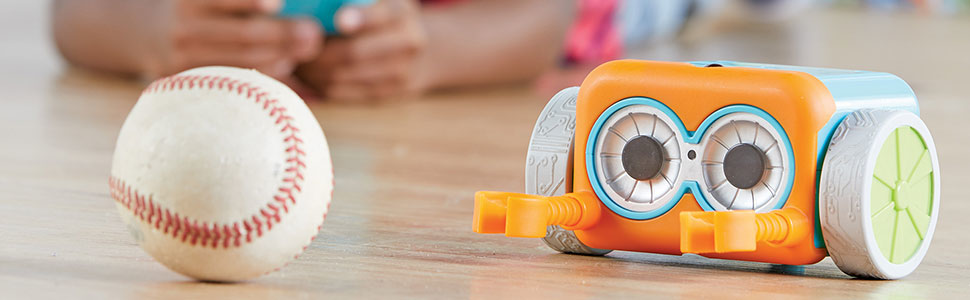
Botley the Coding Robot is a screen-free, programmable robot designed for kids ages 5 and up. Featuring up to 80-step coding, loops, and obstacle detection, Botley comes with a 45-piece activity set including detachable arms, coding cards, and tiles to create interactive coding challenges. Ready to use right out of the box, Botley fosters STEM skills, critical thinking, and creativity through hands-on play without the need for tablets or smartphones.


| ASIN | B077MRB9Z9 |
| Age Range Description | Kid |
| Best Sellers Rank | #12,111 in Toys & Games ( See Top 100 in Toys & Games ) #230 in Educational Science Kits |
| Brand Name | Learning Resources |
| Customer Reviews | 4.5 out of 5 stars 2,623 Reviews |
| Educational Objective | STEM |
| Global Trade Identification Number | 00765023029369 |
| Included Components | Botley’s 45-piece set comes with a remote programmer, detachable robot arms, and 42 coding cards |
| Item Dimensions | 8.1 x 6.2 x 6.2 inches |
| Item Height | 15.75 centimeters |
| Item Type Name | Botley the Coding Robot, 45 Pieces |
| Item Weight | 0.57 Kilograms |
| Manufacturer | Learning Resources |
| Manufacturer Maximum Age (MONTHS) | 96 |
| Manufacturer Minimum Age (MONTHS) | 60.0 |
| Manufacturer Warranty Description | No Warranty |
| Size | 45 Piece Set |
| Sub Brand | Code & Go |
| Theme | Fantasy |
| UPC | 765023029369 |
| Unit Count | 1.0 Count |
K**S
Engaging coding toy!
My 5 yr. old son loves Botley! He has such a cute little voice and sounds so friendly. The set includes such a nice variety of pieces. You can use the 12 cubes and 8 rods to construct a maze that Botley can then be programmed to run through. The cubes can also be stacked to construct a small wall, that Botley can then be programmed to run into and knock down with his attachable arms. There are also 40 coding cards to be used in conjunction with this cube & rod maze or as a stand alone. The child lays out the coding cards and then follows the coding cards one by one while they enter the code into Botley. Then they watch him to make sure that the code they entered follows their desired pathway. If it does great, they can add to it or delete it and try a different combination. The set also includes 2 cones, 2 balls, 2 flags, and a large orange circle that is supposed to be used as Botley's goal to reach. The cones, balls, and flags are nice to use as obstacles which Botley is suppose to overcome. One of the options on the remote is labeled, "Object Detection" and this indicates to Botley that when he runs into one of the obstacles, he is suppose to figure out how to maneuver around it....he has not been successful so far at doing this though and still completing the rest of his course....but this might be user error. The robot also includes 6 double-sided cardboard cards. They measure roughly 6 x 6" each. One side is black and white and the other is multi-colored. When Botley's settings are switched to "line" mode, he runs along the black line outlined on the black and white side of the cards. This feature also seems a little finicky. Sometimes he just spins in a circle because he cannot find the black line so it is important to line him up precisely. Also, the cards really cannot be used easily on a carpeted surface because sometimes the robot's wheels get caught on the carpeting and this pushes him off the black line and he gets stuck. Of all his features this is the one we have struggled with the most. I also wish that they had included about 10x the number of these cards. The path it makes is tiny and short and is really a waste of time to set up. He cannot transition from the cube & rod maze to the black & white maze on his own so they cannot be combined, unfortunately. I wish they had developed a ramp feature so that this was possible because, it would have greatly increased the mobility of Botley and the number of different possible builds for the maze. As it stands both maze options are very small and thus limited. The other side of the cards are brightly colored and designed to practice some more advanced/independent coding opportunities. My son is just starting out and is only 5 years old and so we have only used this option once. But, it does seem to have great possibilities and I'm looking forward to him being able to use this option more in the future. I love that the sound can be turned off (for when the parent gets tired of hearing it or when there is a sleeping sibling in the house). I also think it was such a cute idea to include a list of "secret coding commands" in the instruction booklet. These allow him to preform cute tricks in which he says, "Hi" and spins etc. I don't love that we have gone through about 20 AAA batteries since purchasing it less then 1 month ago. It does have an off switch and this has not been used as effectively as it should have been and yet, I do think that simply using one D-cell battery in both the robot and the remote would have been a much better approach. Overall, we love him and recommend him as a great beginning coding toy. #learningresources #botley
D**R
Botley is a blast!
Our kids were super excited to get Botley the Coding Robot. We have a 3-year old, a 5-year old, and an 8-year old. They could hardly wait to get Botley out of his box. Set up was fairly easy, and required 5 AA batteries (2 for the remote, 3 for the robot). Our 5-year old enjoyed putting the stickers on some of the activity set pieces while the 8-year old read some of the instruction booklet (he was excited to code). We started Botley on the "Line" feature where he can follow a thick black line on the included cardboard play space (like a 2-sided puzzle that can be assembled many different ways). It was pretty fun and the younger kids thought it was great. You can draw your own thick black line on white paper and Botley will supposedly follow it, but we haven't tried this yet. The 8-year old was itching to code so we flipped the board over and tried to follow the coding challenges from the booklet. He jumped right to Challenge 6 and it took him a few minutes to get the hang of it, but once he got started he really enjoyed it. He spent 45 minutes working coding and playing with Botley, trying to get him to do different things. The 5-year old wanted a turn to code next and was very excited. She is a "do it myself" girl so once I explained the steps she really got into it. We used the deck of cards to keep track of the moves she wanted Botley to make, then coding them into the remote. She was so pleased with herself when Botley did the things she "told" him to do! She seemed really satisfied with it. She played with Botley for about an hour the first day, though with adult assistance. The 3-year old was obviously too young for the "ages 5+" recommendation, and with good reason. He liked rolling the balls, LOVED pushing the buttons on the remote, and trying to steal Botley and/or the remote from his siblings the entire day. PROS: - Easy to set up. - Adorable, endearing beeps and noises (uh-oh!, oooooh!). - Remote beeps and lights up to indicate that the button was pushed (when coding), which is very helpful. - Comes with a set of cards so kids can put the "moves" in order to help with the coding. - Booklet has 10 coding activities (in increasing difficulty) to get kids started on coding. CON: - Hard to share, not a great toy for multiple children to play at once I highly recommend a Botley for the 5-9 year old in your life, but if you have more than one child, I recommend you buy two!
N**I
Fun and sparks creativity.
Functions good. My 7year old is still learning how to work with it. Takes a bit to learn how to work with objecy detection. I would buy the pack with all accesories, wish I did. It is better than just this basic pack. That is on me. I shoulf have gotten the one with all accesories. Definite value for the money. Sparks creativity in kids and adults. Easy to asseble, size is good. Seems durable till now.
H**N
Botley is a fun robot. He teaches our son critical thinking skills
Botley is a fun robot. He teaches our son critical thinking skills, problem reasoning, cause and effect, turn taking, and even coping skills when things do go the way he expected them to go. Things I noticed when we got him: -He is not ready to use out of the box. He needs 5 AAA batteries, 2 for the remote, 3 on him. -There are also stickers you need to put on the pieces - My son is 5, it is harder for a young kid to work him with no coding experience. There needs to be an adult to read the manual to help them know how to do the object detection (you need to put in a certain sequence and not just push the button. Just pushing the button will make Botley make a horn noise until object is removed. The sequence you put in will have him go around it. He doesn't go around on its own.) -You also need to press the trash button every time he finishes a sequence to get him to do a new one. All of the above is not bad things, they are just things we learned from trial and error. What we love most about Botley so far: -He is screen free -The black line feature is so fun! My 5 year old loved watching Botley go across the line and just "know where to go!" -You can create mazes and goals for Botley to go through with the included poles, cubes, and balls. My son enjoyed cheering for Botley to make a goal! It even prompted our son to ask higher level questions (which as a teacher, warmed my heart!), such as, "I wonder if I move this over here, what will Botley do?" He provides hours of fun and creativity. We are excited to continue to play with him and watch our son's coding skills grow and flourish. We are happy with our purchase!
H**Y
and she absolutely loved it! It was very easy for her to ...
We got Botley for my 7 year old daughter. We are trying to involve more STEM learning at home, and she absolutely loved it! It was very easy for her to understand and incorporated coding into a fun learning experience. She loved making new obstacles and trying to figure out how to get Botley to his goal. This is a great way to introduce the basics of coding to younger kids while also incorporating fun. A few tips for using Botley: 1. Make sure the surface you are on is flat and doesn't have any surface changes. We noticed it worked well on low pile carpet and laminate best. If we worked on tile, his wheels would sometimes get stick in the grooves and throw him a bit off course, which over the length of the course can cause him to ultimately miss his target. 2. Keep his wheels clean. They are made of a rubber substance that can grab hold of pet hair pretty amazingly, which works great if you are trying to pick up the pet hair, but it can coat his wheels and also cause him to slip when he turns. 3. Keep in mind that when telling him to go left or right, you are basing that off of the view from behind Botley, not from the front, so when helping your littles code, remind them that it is Botley's right or left and not theirs. Overall, Botley is an amazing resource for STEM learning and an overall fun toy to play with!
S**E
Easy, engaging and fun coding robot toy
Great and easy toy for kids to get introduced to coding. Kids can start playing with it straight out of the box. Our 4 year old loves to play with Botley. He can program the movements such as forward, right turn, left turn and backward onto the remote control and then Botley would copy the steps. You can either make Botley do steps entered and than delete them to start again or you can add to the last steps and Botley. There are additional accessories to interact with Botley. You can make Botley follow a line on a set of cards. You can make Botley move the ball into a goal. Botle comes with arm attachments so he can push or sweep things in front of him. There are also flags so you can set up and see Botley try to avoid these obstructions. Overall any kid who loves robot and or coding would love this toy. The suggested age is 5+ but I think younger kids can still appreciate what Botley can do. Some suggestions for improvements. 1. Better carrying box with handle for kids to take Botley with them. 2. Off button on the remote. It goes off when you carry it in a bag. Botley has on/off switch. 3. The arms are great but maybe a tray so kids can make Botley deliver messages or small objects.
A**5
Super cute and Super fun!
Botley is super cute right out of the box. It took us a little while to get the hang of it (be sure to read the Activity Guide), there's a learning curve to be expected. Adult assistance is needed at first. It needs 5 AAA batteries which are not included (2 for the remote and 3 for Botley). You'll also need a small screwdriver to open and close the battery compartments, so make sure you have these extras on hand. The whole family had fun inputting codes for Botley to follow, and watching Botley follow the black lines was captivating to say the least. The kids (8,10) liked drawing their own black lined sequences for Botley to follow. Botley even talks a little, makes funny noises and lights up. So much fun. We are still working on the beginner stage and can't wait to tackle the coding challenges. The kids are having fun, they learn quickly and have a good handle on how to program the remote on their own. I love that it is screen free and mind challenging. I believe in a good balance and Learning Resources provides that. If you like robots you'll love Botley. Hours of fun for children of all ages.
K**R
Kid recommended.
Cool robot toy! Durable and moves as expected. 5year old loved it!
Trustpilot
2 days ago
2 weeks ago