Desertcart purchases this item on your behalf and handles shipping, customs, and support to Lithuania.
๐ Elevate your 3D printing game with precision, power, and peace of mind!
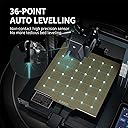
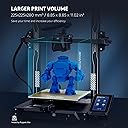
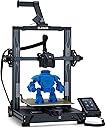
The ELEGOO Neptune 3 Pro is a professional-grade FDM 3D printer featuring a durable dual gear direct drive extruder, an advanced 36-point auto leveling system, and a stable dual Z-axis design for superior print accuracy. Its flexible PEI magnetic build plate ensures easy print removal, while smart features like filament detection and power resume enhance reliability. Operating quietly below 50dB, itโs ideal for both beginners and pros seeking high-quality, hassle-free 3D printing.
| Brand | ELEGOO |
| Colour | Npetune 3 Pro |
| Compatible devices | Laptop, Personal Computer |
| Item weight | 8.1 Kilograms |
| Material | Metal |
| Product dimensions | 60D x 49W x 23H centimetres |
D**Y
Brilliant Printer โ So Easy to Use!
Really impressed with the ELEGOO Centauri 2. It was incredibly easy to set up straight out of the box, with clear instructions that were actually simple to follow. The whole printer feels very user-friendly and well thought out. I was up and running in no time, and the print quality has been fantastic. It takes a lot of the frustration and complicated setup out of 3D printing and just lets you get on with printing. For the price, I honestly canโt fault it. Easy setup, great instructions, excellent print quality and a pleasure to use. Absolutely fantastic printer and I would happily recommend it to anyone getting into 3D printing or looking for an easy, reliable machine. 5 stars from me!
D**K
My first 3D printer, and it's staggeringly good
I did a LOT of research before buying this printer. It was actually a close call between spending a fortune on the superb Bambu X1C which is a truly amazing piece of kit, or doing the sensible thing and going for this entry-level printer as a starter to see how I get on with 3D printing. Well, I'm truly amazed at how good the Elegoo Neptune 3D Pro is - it may be entry-level pricing, but it's certainly not entry-level engineering. It's built beautifully out of solid materials which really feel like they have been made to last. You have to put it together, but Elegoo have supplied a how-to video on the supplied SD card which makes it extremely easy for anyone to build in very little time. I was printing my demo model within an hour of breaking the seal on the delivery box! And then I wished I'd ordered some more filament because you can't print much more than the demo with the sample supplied, but thankfully Amazon came to the rescue again and I had more filament within 24 hours! It's incredible that the printer comes set up to print perfectly straight out of the box. The factory had even levelled the print bed but I decided to run the levelling routine after I'd built it just to be absolutely sure it was spot-on, it only takes a few minutes to do, and then you're good to go. When I went to give this purchase a review after owning it for 3 weeks, during which it's gobbled up a quarter of a reel of PLA+ filament and done about 17 hours of printing, I saw it only has one review... How is that possible? Must have been reset or something. Anyone getting one of these will just want to rant about how good it is! And no, I didn't get it free or have anything to do with anyone or anything related to the product, I'm just an extremely happy buyer! I went straight for PLA+ filaments for the extra strength over PLA, and the Elegoo own-brand ones are available on Amazon for an amazing price, just ยฃ14 a kilo and the print quality is superb. I wouldn't mind paying a bit more for Overture or eSun etc but why do that when you can get it for Elegoo price? Well ok some of the colours are out of stock but if you want black or white to get going with then the Elegoo stuff is brilliant. I used TinkerCAD (Autodesk) for my first few designs, and these came out perfectly using Elegoo's supplied custom version of Cura slicer. I thought it would take me ages to learn how to use them but no, watch a few tutorials and you're good to go. I've even started using the freebie "personal" version of Fusion360 which is extremely powerful and takes over from TinkerCAD which has quite a few limitations for more complicated models. The original demo Buddha supplied was printed with the supplied PLA filament sample at the recommended 200C and that was perfect. When I put PLA+ into the printer, I notched up the temp to 205C which is the bottom end of the temp range for PLA+ and again it printed perfectly. Frankly I'm afraid to change the temps or mess with anything because I can't see anything in my models which could possibly be improved, and if it ain't broke, why fix it? Heheheh! I bought a pack of eSun vacuum bags which come with spare valves and a pump, just to make sure that my filament doesn't absorb too much moisture as I don't print vast quantities of stuff and the filament that's not on the machine is going to sit around for a while. PLA isn't TOO bad on moisture absorption, but a long time could change that and it's a pig to dry filament so just keep it dry :o) What else can I add? Well one negative is that it's quite tricky to change filament mid-print. With the current firmware and the included Elegoo Cura slicer, you'd have to mess with the gcode using scripts and I haven't quite nailed that yet. It's quite possible this will be addressed with future software/firmware updates as it's mainly a procedural process rather than a hardware limitation, although it will still require manual changing of the filament at the appropriate time - if you've got the money for a Bambu then of course you can get a multi-filament unit for it which does it all for you, but that facility costs a lot more money! So for anyone wondering whether or not to dabble in 3D printing, this is THE machine to start you on the road. The price is amazing, and the build and results are better than you could have hoped for at anywhere near that price. And if you get stuck, you can ask their tech support - the only question I needed to ask so far (can I use PLA+ as it's not listed in the materials) was answered by a very friendly agent within one working day, you can't ask for better than that!
G**E
No better option for the money
So, this printer is incredible. It's quick and it prints great. I have used a few different filaments and it's handled it all amazingly. Customer service: When I had a problem using Cura slicer, they responded quickly and was more then willing to help. Suggested that I try using orca slicer instead and I have not had any problems since. With Cura I got some wall shifts, which went away once I started using Orca Bed levelling: As per the instructions, you should use a sheet of paper to level the four corners of the bed. This is the correct method, however some additional advice is to go around a few times to make sure it's level at every point. Build plate: I started out printing not using any glue and it worked great. After a few prints however my parts no longer stuck and I had to start using the glue provided. It ran out and I replaced with cheap glue from amazon and it works just as great. Klipper: works amazing. Ethernet was easy to set up and I can now print directly from Orca slicer, no longer need to run to the printer with the thumb drive. Webcam setup was just as simple and although the FPS of that camera is very low (10fps) it's a great way to keep an eye on your print from any web browser that's on the same network. I currently have a enclosure so I am using the usb port for the light that came with the enclosure and that too works great Usability: It's more about the slicer than the printer I think. If you send proper GCode to the printer, it handles it perfectly Speed: I have printed some 20 hour projects and they look amazing. Most smaller prints takes anywhere from 40 minutes to 1:30 hours depending on the settings in Orca. This can be changed to print quicker, but I found that that's the sweet spot for me. File format: I have designed parts in Blender and Freecad (Freecad being my favorite as it's a bit less of a learning curve) works great if you design with printing in mind. Thinking about things like overhangs and bridges is very helpful in the design process as support, although printed perfectly with this printer is sometimes hard to remove from smaller cavities. Fluidd: The web based interface is pretty decent, allowing you to view the webcam, see progress and monitor temperatures. Also allow some printer control, like turning the lights on and off and changing the z axis or moving the print head Using more than one color: In the slicer you are able to insert a pause in your print, allowing you to change the filament to a new color. This works great as the printer just resumes where it left off completing the print seamlessly. Assembly: Quick and easy. You do need some space to work and the clip for the cable is a bit too small, first print should probably a new cable clip (you can find the stl on printables) Issues: Wall shifting using the included cura slicer. I tried both versions of Cura, the downloaded new version and the included old version and wall shifting was a problem with both (Problem resolved with Orca slicer) Issue 2: this printer is noisy. I had to move it to the garage as the fans are just too noisy. After putting it into an enclosure, it's been a bit better but still pretty noisy. Issue 3: prusaslicer does not yet include settings for the 4 pro. After a bit of googling, I found a config file, but it's not as nice as when you install 3 pro for example, as that has presets for fine , draft or the normal print settings. All and all, an amazing printer. It's my first 3d printer and opened a world of design and imagination for me that I am very pleases with. Currently printing a laptop stand, made my own phone stand, speaker stands and lot's of organizational items. An amazing hobby to have as you get to make stuff, especially when you take some time to learn design and let your imagination flow. Things to get: (optional) * Smooth build plate * Cutters. (it seems like they no longer come with cutters, so that will be an extra expense) * More glue * More 3d printer grease * Fun or functional filament * a Solid desk or platform for the printer to stand on Best part is that printing items cost very little, so you get to print a lot with just one role of filament. Most expensive item I printed to date cost ยฃ3.20 and I would have paid at least ยฃ15 for the same item if I bought it from a shop. Amazing printer, well worth the investment and customer service is top quality. Highly recommended
J**W
Awesome
I've had this printer for nearly a year now. It's a fantastic starter printer. The prints are very good, its easy to build and I've had no real issues caused by the machine its self. Some of these reviews mention print quality not being great and other issues, but seriously, that's just a bad set up in the slicer settings, nothing to do with the machine whatsoever. Just spend some time playing with the slicer settings in orca slicer until you get them just right. Oh and the people who say the print doesn't stick to the bed after a few weeks...... Try cleaning the bed you IDOTS. You will need to clean the print bed after say 10 prints. Alternatively calibrate your Z axis properly you muppets. But seriously, this is a great machine for the money. You can even upgrade the software to klipper like I have. Makes it run like a neptune 4 pro. You'll need a raspberry pie to achieve this.
R**.
Will be sticking to Bambu
Coming from a predominantly Bambu background (A1's, P1's and H2 series), going with this was a bit of a punt, but I needed a relatively cheap printer to add to the collection. First thoughts were go for another A1, but for a Core XY multicolour at this price point, it was worth a go. Had it for a day now and got 15 hrs on it, and to be honest, I'm impressed. Set up was fairly straightforward, one niggle was that they provide some allen bolts and of the three keys they supply, none fit. Luckily had a set to hand. Their slices is their version of Orca and it works well. One thing I do notice is it keeps getting the odd network error when sending to the printer, but a couple of attempts seem to solve the issue. Prints are comparable with Bambu and apart from having to switch slicers as Bambu have locked theirs down, it's no bother. Letโs see how it goes long term, but for now impressed. *** Update*** Weโll honeymoon period is over. This is now starting to irritate. Elegooโs slicer constantly reports network errors when trying to upload. There are issues loading filament and its hit and miss. When it prints itโs fine, but too many niggles that may result in returning. **Final Update** It's going back. I've had numerous issues with sending prints to the printer from the app, either errors sending, or printer had dropped the wifi connection.
V**D
Capable printer let down by Elegoo
I wanted to change my old Sidewinder X1 with something more capable as it was starting to struggle with more demanding materials. This was my first CoreXY machine and I didn't know what to expect. Let's start with the good : * The printer has surpassed my expectation not in terms of speed or print quality, which everybody said it was great, but with the accuracy, having to modify all my current designs that we're account for the old printer's tolerances from 0.2mm in most cases to the actual value. Mindblowing! * The Canvas system works as advertised and it's a very convenient filament management system, as not many people will actually use it for multicolor printing due to the waste it creates. This is not the fault of this system but a limitation of the single nozzle printers. * Build quality is good with solid steel sheet panel, only the top hat feels a bit cheap but that's the nature of transparent plastics I guess. * Easy to put together with mostly clear instructions. It might take you about 20-30 minutes to mount everything to the chassis. The negatives : * Not having an enclosure for the reels is a problem when working with hygroscopic filament like PETG. When doing a 10 hour print you could actually see the print quality get worse and worse as the filament absorbs moisture from the air. I have to say that part of the fault was the filament as it was very wet even after drying it for 8 hours in the oven. Regardless, this is a must if you're printing anything other than PLA. * Unable to pause at a certain layer, even using their slicer. As someone who prints technical prints most of the time this is a must. Releasing a product that lacks basic functionality is unacceptable. * Unable to save the Z-offset. This might have been adressed in the latest firmware but this falls in the same category as the one above. * I wasn't able to print TPU as I couldn't find the advertised TPU adapter anywhere when I had the printer. Files seem to be available at the time of the review so you'll probably be fine. Neutral : * Printer is a bit noisy but the door and the hat keep the noise level manageable. * 2 of the 4 spool holders were claking so I had to untighted the bolt a bit and it went away. Overall this is a very capable printer that impressed me. If Elegoo would release a fully working firmware I would actually recommend it. There is a comunity made model that adresses the lack of an enclosure but as it I was forced to return it.
P**O
Fiddly setup but after dozens of hours of printing I'm in love with this machine
I am a photographer and have been interested in 3D printing initially for printing specific tools to help me in my studio. I have a couple of friends that own 3D farms and produce all sorts from cosplay to tools and product prototypes. They recommended a machine nearly twice the price of this but after a lot of reading I went with the Elegoo CC2. It was fiddly to setup but once done I was printing within an hour and its barely stopped since, printing everything from stands for gobo's in the studio to dragons for my daughter and accessories for my air duster and mini vacuum. I also printed stands for my drones and Im now learning CAD as a hobby that I think will assist me with creating custom tools for product photography. So far Ive printed in PLA, PLA Pro and PETG and the few mistakes and failed prints Ive had were entirely user error. The only gripe I have is you MUST have it in LAN mode only to send files from your PC, every time I tried to use their app it fails to connect. I expect this to be updated and frankly I use my PC mostly anyway and connect it to Home Assistant so I can monitor prints when Im out. So heres my breakdown: PROS * Excellent quality prints (always use high quality filament, its worth the extra pennies Elegoo, Sunlu or ESun are great) * Nice quality build on the machine * Easy to learn slicer, although the nuances of printing will take time to learn * Super smooth prints when you correctly dry your relevant filament * Easy 4 colour printing * LAN only mode works flawlessly * Integrates with Home Assistant Cons * App does not work properly, simply wont connect via cloud * One or two screws were awkward to install on build (thanks to my wifes small hands we managed)
B**R
Sounds and feels like a jet taking-off in your lounge - had to return it.
Fantastic printing of the 'Benchy' straight out of the box and setup, which honestly was so easy a 5yr-old could do it. Why I RETURNED IT FOR A REFUND - IT'S SHAKES AND BOUNCES WHILST MAKING A HUGE FAN-NOISE THAT CAN BE HEARD NEXT-DOOR AND I'M DETACHED! A crying-shame as this printer is a superb performer except for the deafening noise and the nerve-shattering vibrations, unbearable to have it running - running it through the night - only if you want to sleep out in your garden.... A real shame, so much potential apart from the above.
V**H
Perfect 3D Printer
Realy a great Printer, Im hapy to have it!
P**A
Good printer
Good quality prints
Trustpilot
1 day ago
2 weeks ago