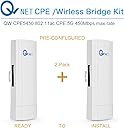
Buy QWNET CPE5450 Wireless Bridge Kit, 5GHz 450Mbps 802.11ac Pre-configured CPE Kit, 3KM Max. Range Indoor & Outdoor Point to Point Client Bridge, Wireless Access Point【2-Pack】: Wireless Access Points - desertcart.com ✓ FREE DELIVERY possible on eligible purchases Review: This is really easy to set up and it works GREAT! - Everyone was right - ignore the getting started guide - it will just really confuse you. Here are 3 easy steps... 1. Test the units to make sure they work before you start drilling holes. One unit is set as master (look at the microswitch on the bottom), connect this one to your base router. Connect the other unit, (switch is preset as "S" for slave) to your PC via an ethernet cable, (this is for the test - when you do the real install, the slave end will be connected to a remote router in the location you're trying to provide internet access). 2. Cabling. You need 4 cat5 cables. The ones included in the box are ok for the test, but you will likely need at least two long cables - one running from the POE connector to the outdoor QW master and the other on the receiving end running from the QW to the POE on the remote end. Here's how to config the cables: Connect one cat 5 cable to your router, the other end to the LAN side of the of the POE (power over ethernet) connector. Plug another cable in the POE socket and the other end to the WAN slot on QW master unit. Same on Slave end, plug one ethernet cable into your PC (again for the test), the other end to the LAN side of the POE plug, then second ethernet cable from POE side of plug to the WAN slot of QW slave. Lights should be flashing and all 4 strength LED's should be lit. 3. Precise aiming not necessarily necessary. My distance between the two QW's was roughly 200 ft. I bolted one to the house and the other to my outbuilding - they weren't perfectly aligned and they work great, (better than fine). Maybe if you're bridging a long distance then accuracy becomes critical, but not at 200 ft. WRT cabling - I needed two 50 ft flat ethernet cables to run from the QW units to the POE connectors, and two six foot ethernet cables to run from the routers to the POE connector. You only use the WAN socket on the QW units - the LAN sockets remain empty. Only one cable is required to run from the POE connector to the QW. I hope this helps. These units really work well and you'll be pleased with the performance. Review: Just works! - Just works! If you can muddle through the poorly written instructions and plug things in the way they say/show, it just works! You don't have to change your IP, connect to them directly to configure or anything. Just plug the POE and data into correct ports for master and slave like they show, point them at each other as best you can, and boom, you've got a remote network. When pointing them at each other, accuracy is more important the farther your remote site is. I was only going about 50 yds, so I had no trouble whatsoever. I'm sure I'm not pointed exactly, but working fine with no noticeable performance issues. I'm running four 2K (double 1080p) cameras off a POE switch at my remote building without a hitch. They all picked up IPs from my main router using DHCP. They've been running steady for about a few months now. No reboots or anything needed yet. Seem very stable. Haven't had a good rain yet so we'll see how it pushes through that, but at my distance, I suspect it'll be okay. My setup for those trying to make sense of the instructions: The one at my main building: Set as "master" (there's a switch). Cable from WAN port to my network switch that plugs directly into my router. LAN port to the POE port on the provided adapter that plugs into power. The one at my remote building: Set as "slave". Cable from WAN port to the POE port on the provided adapter plugged into power. LAN port to my POE switch running my four cameras. I mounted each on a "Ubiquiti Universal Antenna Mount UB-AM", sold here on desertcart. Worked great.
| ASIN | B072Y5S8YX |
| Brand | QWNET |
| Built-In Media | Instruction manual |
| Connector Type | RJ45 |
| Customer Reviews | 4.2 4.2 out of 5 stars (85) |
| Item Weight | 1.9 Pounds |
| Manufacturer | QWNET |
| Range | 196 Feet |
| UPC | 730440062268 |
| Wireless Compability | 802.11a, 802.11n |
B**.
This is really easy to set up and it works GREAT!
Everyone was right - ignore the getting started guide - it will just really confuse you. Here are 3 easy steps... 1. Test the units to make sure they work before you start drilling holes. One unit is set as master (look at the microswitch on the bottom), connect this one to your base router. Connect the other unit, (switch is preset as "S" for slave) to your PC via an ethernet cable, (this is for the test - when you do the real install, the slave end will be connected to a remote router in the location you're trying to provide internet access). 2. Cabling. You need 4 cat5 cables. The ones included in the box are ok for the test, but you will likely need at least two long cables - one running from the POE connector to the outdoor QW master and the other on the receiving end running from the QW to the POE on the remote end. Here's how to config the cables: Connect one cat 5 cable to your router, the other end to the LAN side of the of the POE (power over ethernet) connector. Plug another cable in the POE socket and the other end to the WAN slot on QW master unit. Same on Slave end, plug one ethernet cable into your PC (again for the test), the other end to the LAN side of the POE plug, then second ethernet cable from POE side of plug to the WAN slot of QW slave. Lights should be flashing and all 4 strength LED's should be lit. 3. Precise aiming not necessarily necessary. My distance between the two QW's was roughly 200 ft. I bolted one to the house and the other to my outbuilding - they weren't perfectly aligned and they work great, (better than fine). Maybe if you're bridging a long distance then accuracy becomes critical, but not at 200 ft. WRT cabling - I needed two 50 ft flat ethernet cables to run from the QW units to the POE connectors, and two six foot ethernet cables to run from the routers to the POE connector. You only use the WAN socket on the QW units - the LAN sockets remain empty. Only one cable is required to run from the POE connector to the QW. I hope this helps. These units really work well and you'll be pleased with the performance.
S**W
Just works!
Just works! If you can muddle through the poorly written instructions and plug things in the way they say/show, it just works! You don't have to change your IP, connect to them directly to configure or anything. Just plug the POE and data into correct ports for master and slave like they show, point them at each other as best you can, and boom, you've got a remote network. When pointing them at each other, accuracy is more important the farther your remote site is. I was only going about 50 yds, so I had no trouble whatsoever. I'm sure I'm not pointed exactly, but working fine with no noticeable performance issues. I'm running four 2K (double 1080p) cameras off a POE switch at my remote building without a hitch. They all picked up IPs from my main router using DHCP. They've been running steady for about a few months now. No reboots or anything needed yet. Seem very stable. Haven't had a good rain yet so we'll see how it pushes through that, but at my distance, I suspect it'll be okay. My setup for those trying to make sense of the instructions: The one at my main building: Set as "master" (there's a switch). Cable from WAN port to my network switch that plugs directly into my router. LAN port to the POE port on the provided adapter that plugs into power. The one at my remote building: Set as "slave". Cable from WAN port to the POE port on the provided adapter plugged into power. LAN port to my POE switch running my four cameras. I mounted each on a "Ubiquiti Universal Antenna Mount UB-AM", sold here on Amazon. Worked great.
P**R
This product works great, but the manual is misleading.
Don't use the quick start printed guide, it will drive you crazy. They sent me a .pdf file that was "ok" but beware because the captions don't always go with the picture they are under. Very confusing. Eventually got it going after some problems getting into the menus, you have to change your IPV4 address to 192.168.188.22 subnet 255.255.255.0 or it will not talk to you. Unfortunately, once you do that you can't access the internet (at least, I couldn't) until I changed back to "automatically assign the IP address". Otherwise, the bridge works across about 150 meters line-of-sight between 2 buildings. The antennas are mounted on 1 1/2 " diameter poles 4 feet long using clamps and screwed into fence posts across the yard at a height of about 8 feet off the ground. My speed is remarkable: 40 Mbps, which is about half what it is when sitting next to the actual router in the main house. Very quick response time! I had sent an email to their tech support and after a week I have not received any response. Oh well. Their website is in Chinese, good luck with that! Hey, it is saving me about $80/month in Comcast fees by letting me feed off my main house's internet router! BTW, it could use a bit more room to install the cables, especially if you are using flat Cat 5/6 cables vs. round ones. The cover may not close. I'd just use some Coax Seal on it to fix that problem.
Trustpilot
3 weeks ago
3 weeks ago