Buy anything from 5,000+ international stores. One checkout price. No surprise fees. Join 2M+ shoppers on Desertcart.
Desertcart purchases this item on your behalf and handles shipping, customs, and support to Lithuania.
🎯 Roll into precision, scroll with ease, work in comfort — the Expert Mouse revolutionizes your desk game.
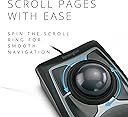
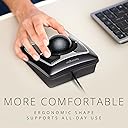
The Kensington Expert Trackball Mouse (K64325) is a wired, ambidextrous input device featuring a large 55mm ball with DiamondEye optical tracking for precise cursor control. It includes a patented scroll ring for smooth navigation, a detachable ergonomic wrist rest for comfort, and four customizable buttons configurable via KensingtonKonnect software. Compatible with most major OS except Windows ARM, it connects via USB-A for reliable performance and is backed by a 5-year warranty, making it a top-tier choice for professionals seeking enhanced productivity and ergonomic design.


| ASIN | B00009KH63 |
| Additional Features | Ergonomic Design |
| Antenna Location | Office |
| Are Batteries Included | Yes |
| Are Batteries Required | Yes |
| Best Sellers Rank | #2 in Computer Trackballs |
| Brand | Kensington |
| Built-In Media | Detachable Wrist Rest, Kensington Trackball 4-Button Usb Expert Mouse |
| Button Quantity | 3 |
| Color | Black Silver |
| Compatible Devices | Surface Laptop 1st Edition 13", Windows 7, Windows 8, Windows 8.1, macOS 10.8, Windows 10, macOS X 10.11, macOS 10.10 or above, Chrome OS 44 or above, macOS 10.9, macOS Sierra 10.12, macOS 10.13 or above |
| Connectivity Technology | USB |
| Customer Reviews | 4.3 out of 5 stars 4,443 Reviews |
| Embellishment Feature | Crystal |
| Enclosure Material | Plastic |
| Finish | Matte |
| Global Trade Identification Number | 00085896643258, 50085896643253 |
| Hand Orientation | Ambidextrous |
| Hardware Platform | PC |
| Item Dimensions L x W | 9.75"L x 3.5"W |
| Item Part Number | 64325 |
| Item Weight | 0.34 Kilograms |
| Manufacturer | Kensington |
| Mfr Part Number | 64325 |
| Minimum Required Operating System Version | Windows 7 |
| Model Name | K64325 |
| Model Number | 64325 |
| Movement Detection | Optical |
| Movement Detection Technology | Optical |
| Number of Batteries | 1 12V batteries required. (included) |
| Number of Buttons | 3 |
| Operating System | Windows 10, Windows 7 |
| Pattern | Mouse |
| Power Source | Corded Electric |
| Range | feet |
| Special Feature | Ergonomic Design |
| Style Name | Wired |
| UPC | 638458744902 085896643258 809385141014 666669843022 803982736673 |
| Unit Count | 1.0 Count |
| Warranty Description | 5 Year Warranty |
J**S
Computer navigation the way it should be!
After having read several reviews around the web and being aware of the potential downsides as well as the upsides, I decided to buy myself one of these. Boy, am I glad I did. Admittedly, I'm the kind of person who's not satisfied with the typical mousing solution (I have really big hands and I do a lot of delicate work) and likes to try new things, so if that's not you then you may want to try one out before you buy if possible, or at least get one with a return policy. Caveat emptor. That being said, short of building a custom one myself, the Kensington Expert Mouse is pretty much what I want in a trackball, and having used it for awhile any regular mouse feels foreign and less-than-intuitive. First, the cons, in order of greatest to least issue (and they're all minor issues to me anyway). :: It does have a bit of a backward slope to it, probably about 10-15 degrees, which my large hands and already-tilted desk find mildly awkward. If you have a desk that's fairly high above your lap, then that backward slant will probably match the angle your arms are already at and this won't be an issue. :: The scroll wheel, as has been mentioned elsewhere, does feel a little scratchy, like a plastic-on-plastic sort of texture. It's not quite the buttery-smooth, gliding motion you expect after using the ball itself (more on that later) - it feels more like the back of a plastic spoon sliding across a Formica counter. That said, mine wasn't that bad, and probably would go away with a bit of silicone oil, but other reviews range from "not a problem at all" to "nasty-feeling deal breaker" so I suspect that Kensington's quality control could use a bit of tightening up. Again, get one with a return policy in case you don't like it. Common sense. I find myself using the scroll wheel less than I would otherwise anyway, as I've mapped one of the buttons to middle-click and I use that in web browsers to scroll up and down by moving the cursor. Smoother and easier than the scroll wheel. :: Occasionally, a button click won't register if you press the button on the corner or edge - you have to get closer to the middle. Rarely an issue unless I'm gaming, because my hands have a large span and I may physically miss the button at a critical moment when I'm not paying attention. It'll come with practice, I'm sure, just something to be aware of if you have palm-a-basketball-sized hands like me. Now, to the pros! Whee! :: Yes, it's got a pretty big footprint - it's about 5.5" by 9" with the included stiff-foam wrist rest (which I do recommend using, because of the aforementioned back angle) - but it doesn't move around. It takes up about 60% of the desk space that you'd dedicate to a typical mouse pad. Especially on those pull-out keyboard trays, there isn't enough room to use a mouse, but since the Kensington Expert trackball is under six inches wide it'll fit in a nice little rectangle next to the keyboard. Height is another matter, since the ball itself sticks out pretty high, but I don't personally find it to be too much of an issue. YMMV. :: The four large, programmable buttons. I'm not a lefty, but I mouse left-handed, so being able to map the buttons to essentially whatever I want with Kensington's free software is absolutely a blessing. In addition, different people will prefer to use different fingers for tasks of varying frequency, so whereas I don't right-click much and map it to where my ring finger sits, someone else may put it under their index finger or thumb. The software in general is pretty easy to use, and has enough functionality to feel nicely customizable without being so in-depth that only an advanced power user can take advantage of its potential. :: The trackball. Oh, that trackball. Smoother than a greased Fonzie on a Teflon-coated ice rink. Right out of the package it actually feels slightly rough or not as free-spinning, because the ball and its three contact points are completely pristine. Once you get some skin oils on it through use, it's like buttah. Gross-sounding, I know, but pretty much everything you touch gets skin oil on it. Speaking of which, the ball is just dropped into its socket, so to clean out the inevitable gunk that will accumulate in any trackball assembly you just have to turn it upside down and the ball falls out. No disassembly required. The inside of the socket is smooth plastic, so you just wipe it out and get back to work. The ball itself has a nice bit of weight to it, and is positively pleasurable to the hands in use. It's got a solid feel and has some inertia when you move it, which brings me to the next point... :: It has an infinite range of very smooth motion. I currently have a dual-monitor setup, and (besides being very awkward and un-ergonomic) I despise having to pick up a mouse, move it back to the other side of my mouse pad and continue my motion across the screen. DESPISSSSSE. It makes my fingers recoil just thinking about it... Ahem. Anyways. A quick flick of the ball will send the cursor moving across the screen, and the ball's inertia will continue the motion. It doesn't jump around or go crazy, it just follows the ball like it's supposed to. I have the acceleration parameter in the software set to maximum, so a fast motion of the ball will cover lots of ground quickly, but slow motions will still allow fine, precise positioning of the mouse. This becomes an even greater blessing with triple- or quad-monitor setups, and once again, this trackball takes up less desk space than an ordinary mouse. You don't have to have a huge screen to need this, either... for extra-fine work like Photoshop or video editing, you may want to slow the cursor speed down, which effectively makes the screen much larger relative to the motion of the mouse. There is no picking up and putting down with the Kensington Expert trackball - you just keep rolling. If you're not there yet... keep rolling. It feels natural, the way navigating a computer should. So, to sum it all up, I guess I could say that I love my Kensington Expert Mouse because it feels right. It's intuitive to use, customizable, ergonomic, and it just works. There are a couple little niggles, but in my humble opinion they are far outweighed by how they make my computing experience easier and more natural. Because everyone has different needs for their computing experience, not everyone will want or need one of these. If I was just an occasional casual computer user that isn't concerned with ergonomics or ease of use, I would absolutely think twice about spending $75 on a mouse I'm not sure I'll like when the one I have mostly does what I need it to. But that's probably not Kensington's primary market here. For me, and people like me, it's worth the money to make my interface with my computer feel good, because I use it every day.
L**S
Best trackball I've ever found, period
UPDATE: MAY 2017 I continue to LOVE this trackball. It's smooth, functional and lets me do everything I need in my graphic design/marketing studio. Of the 4 in the shop, one has developed some gravelly sound in the scroll ring and so it will need to be replaced, but the others are all working just fine years after purchase. I've used every version of this 4-button trackball since 1989, and it's been universally wonderful. Disregard the drama queens to who bitch about this product. They either got a defective unit or messed it up themselves, because I've had 29 years of personal experience that proves that Kensington has a SUPERIOR product in this trackball. NOTE TO ANYONE WHOSE TRACKBALL ISN'T WORKING PROPERLY: You have a defective unit! Tell Amazon or Kensington about it and arrange to have them send you a replacement unit. In any run of mass-produced products you'll always get a small few that are defective. Call customer support and get it replaced. UPDATE: OCT/2016: I LOVE this trackball (even though they call it the Expert Mouse). I've used my current model for over 4 years without a single problem. It's fast and does not stress my wrist at all because I control it with my fingers. Every couple of months I take the ball out and turn the unit upside down to dump out any dust and hair that have accumulated in the ball cavity. It's a good idea to take a tissue and gently wipe off the 3 sensor points so they're not clogged with dirt and skin oils. Maintenance is a snap. If your hands/fingers are really oily you might have to occasionally take out the ball and wash it with soap and water, but that's about it. I work for 8-10 hours every single day at my computer with Photoshop, InDesign, Illustrator and Muse (all from Adobe Systems) and it lets me be very fast. I set the Trackballworks software so that the cursor flies around the screen with the flick of my fingers. I simply wouldn't work without it. The big ball rolls easily and is essential to my workflow.; DEC 1/2014: The Kensington Expert Mouse is actually not a mouse at all, but a trackball that is well-made and very durable. I've used Kensington's Turbo Mouse, an earlier version of this product, starting in 1989 and its various iterations ever since. It connects via USB 2 to either Mac or Windows, and replaces the standard mouse that comes with your computer. Software drivers for Mac and Windows are available on Kensington's site. Why should you replace your mouse with this product? The Expert Mouse has a large ball about the size of a pool ball that you move with your fingertips. You can rocket the cursor quickly to any part of your monitor with a simple flick of your fingers, instead of having to move your whole arm with a regular mouse. I often work 8-10 hours a day at my computer and a 30" monitor doing graphic design work, and the Expert Mouse prevents stress on my arm and hand. For right handers, left-clicking is done with your thumb on the lower left button. Right-clicking is done with your little finger on the lower right button. However, you can program any of the 4 buttons to do any of these two actions, and custom-program other actions with the remaining 2 buttons. Speaking frankly, I LOVE this trackball, as it keeps me productive and speeds my work immensely. New users may notice the ball may move a tad sluggishly when they first unpack the trackball, but this quickly goes away with a few minutes of use. The speed of the cursor can be easily adjusted with the supplied driver/software to your liking. The trackball takes up very little desk room. It's only 5" x 6" and no mouse pad is required. Around the ball is a scroll ring that allows you to quickly scroll around your documents and web pages in a flash. I could never go back to a mouse. The Kensington Expert Mouse is absolutely the best trackball product I've ever used, and I've been using it or its direct ancestors for 23 years! It may take a day or two to get used to it, but when you do you'll never want to use a regular mouse again. It's really that good. Cleaning is easy. I recommend that about once a month that you simply pick up the unit, hold your hand over the ball and turn it over. The ball will fall into your hand. Tap gently on the bottom of the unit to release dust, food particles, hair, dead skin cells and other gunk that's built up. You may have to use a tissue to wipe out the ball cavity and polish up the ball itself to remove any grime or skin oils from your hand. You can even wash the ball in mild, soapy water if you have excessively oily fingers. It's advisable to use a tissue to remove the gunk that builds up over the 3 tiny balls inside the ball cavity, as these can build up with dirt, fuzz and grime over time. It usually takes only a few seconds to do this every month or so, so it's not a bother. Your trackball should last you for many years of lightning-fast, smooth cursor action if you do this. My current Expert Mouse is over 5 years old and going strong, without a single problem in that time. UPDATE: JUNE 10, 2013 These trackballs last a LONG time! I'm buying a new Kensington Expert Mouse to replace one I bought over 4 years ago. I must have had something on my fingers that has caused the scroll ring rubber to start breaking down and get sticky (possibly bug spray). I'm putting in my order for a new Expert Mouse in the exact same model because it's the best computer trackball I've ever used--and I've been using the various versions of this product since 1990! There's just no other trackball that works as well and is so durable. I use mine with a Mac Pro at work and an iMac at home, and sometimes even take it along on the road to use on my MacBook Pro 17" when I travel. Simply the best! I give it another 5 stars.
D**E
This trackball still reigns supreme.
I have written a complete review of this device in its Wireless Version which is no longer manufactured. Its overall design has been well described in these numerous reviews. I would like to address a few of the complaints registered in some of the reviews on this thread, at least IMHO: 1) The bearings on which the ball rests are different, and overall, there is no significant change in build quality which is more than adequate. 2) Initially I also had some difficulty on Win7/64 with Trackball Works 1.04 and 1.01, the European version which tech support recommends when you call in to complain about the former. In my case, this represented some sort of software conflict which was no longer the case when I gave it another try after having had to reformat and reinstall my system for other reasons. Initially, although I could program the trackball without difficulty, it would intermittently hang, or my computer would crash. Since the reinstall, now for about 3 months use, Version 1.04 works absolutely fine with this Expert Mouse, but install the software before connecting the device, as mentioned. Absolutely NONE of the initial problems have recurred. Trackball Works has some problems with complete programming of the Slimblade Trackball version and Kensington is working on it, with a supposed upgrade to the software due in March, at least at the time of this writing. 3) The ergonomic issues raised by some of the reviewers are legitimate, but it depends a great deal on the individual user. I agree that the "wrist rest" supplied is not a very successful solution. Some will prefer the flatter format of the Slimblade, but I don't think the four buttons work as smoothly as those on the Expert, and are very dependent on where you place your fingers on them, which is not the case with the latter which are nicely designed. At work, I use this trackball for hours on end, now for years, in our radiology department, scrolling through images, and have had absolutely no wrist or finger pain. One of the tricks is to operate the mouse with your hand canted to the right at about a 30 degree angle which helps to obviate more extreme wrist extension. Give your hand and wrist a brief rest by changing position every few minutes which can easily be done automatically during the workflow since you aren't gripping something. Any pointing device without rest will be a nuisance. For those who are particularly sensitive, place a small bean bag place under the palm of the hand, not the wrist. Since you aren't spatially moving the unit, it is not intrusive, if you buy a proper sized bag. 4) Complaints about the scroll ring, IMHO, are entirely unjustified. It works very well. I have had no problems with its function on this unit, my previous wireless mouse, or any in our Department at work. 5) Complaints about the ball's being sticky and insensitive are also groundless, IMHO. You will find slight "newness", reflected in slight stiffness,when you first use the unit. This will clear promptly, and even more quickly if you just spin the ball for a couple of minutes with moderate downward pressure to break in the interface between the support pins and the ball. Periodically clean the ball with a little soap and water, then alcohol to restore a smooth surface, and repeat the conditioning routine, in an abbreviated form. At the same time, inspect the pins on which the ball rests for accummulated dust and debris, and make sure they're absolutely clean. Works like a charm. For those that don't like the scroll wheel, try the Slimblade where scrolling is done via the ball itself, turned transversely. That works well....it's just a matter of personal preference. I personally prefer the larger ball on the Expert versus the Slimblade, and the independent scroll wheel. The interface cable on the Slimblade is a little more robust and less prone to kinking if you move the trackball around quite a bit, for example, if you're also using a graphics tablet on which you seat the trackball. In any case, I don't think it's an issue, particularly if you take a bit a care of how you set the mouse down so that it isn't repetitively stressed with a kink. BTW, I couldn't find the magnet that one reviewer talked about at the bottom of the receiver for the ball. All that's there is the optical pickup. BTW, if you use the Intuous 4 Wacom tablet, the RF mouse they supply is greatly improved over previously, and is nicely programmable, except for no control over acceleration which some users may find a distinct negative. Bottom line: HIGHLY recommended after years of experience using this trackball. Works perfectly well with Win 7/64.
T**.
After more than 20 years of daily use of a "Expert Mouse 5.0" (Serial/PS-2) here's how I feel on day 1 with this new model...
As a long time user and huge fan of the older model (that was a different chassis shape) I'm giving this USB Expert Mouse 4 stars out of 5 initially and I will go back and re-review this product further once I get to spend more time using and evaluating it and I really get to compare it to the older version. My only reason for replacing my old one after so many years is because I need USB for a KVM switch and my old one is Serial/PS-2 only. I've read a significant number of less than favorable reviews on here about this newer version that were saying how some users feel this model has either one of 2 problems or both. These negative reviews were mostly from either first time trackball users who were only used to moving a mouse around their desk surface with their arm and had no idea what to expect with a track ball or from users of other (cheaper) brands who were looking for better quality but chose to complain about what they claimed to be a heavy, stiff, bulky movement of this unit's big trackball but some of the lower star reviews it received were also from users who went from older models of the Expert Mouse to this new redesigned model. The other complaint had to do with wrist position comfort and again came from both new users and a few who had an older Expert Mouse version like the one I've been using daily for over 20 years, many of which didn't know what to expect when switching from a mouse to a track ball, and quite a few who already had wrist problems before they bought one of these units to try. Note that my old Expert Mouse trackball still works, even after 20 years of daily use, but I needed USB for a KVM and I couldn't come up with a working PS/2 or Serial to USB converter solution that would stay working after being passed through the USB KVM and/or didn't cost more than the KVM and this track ball cost when purchased together so I opted to replace my vintage Expert Mouse with this one and time will tell if I'll be as happy with this new one as I've been with the original but here are my initial findings at the beginning of day 1 with this new model... As I just took it out of the box, unplugged the PS/2 plug of my 20 year old Expert Mouse, and plugged this brand new restyled USB Expert Mouse into my PC here is what I've determined so far... For whomever has complained about the stiff, hard ball movement, as a regular daily user of an original Kensington Expert Mouse that I've had since I bought it new literally 20 years ago (in the days of Windows 3.1) I must say that they are wrong, period. Although it doesn't feel like it's hovering weightless beneath your fingers as the Logitech products with their smaller ball tend to feel (especially after they literally get greasy from oily hands), it also doesn't feel all slippery with no user feedback like the Logitech products do, and the "massive" ball (as they called it) not only glides as smooth and easy on this new model as the original Expert Mouse did, the ball also has that same solid feel with great control and excellent feedback beneath your fingers as the older models did too! At my office there are several audio editing workstations with Logitech track balls on them (which suffer from left button failures and need to be replaced at least annually) so I'm totally familiar with both brands and types of these products and I'm okay with using the tiny ball and the crazy slickness of the Logitech track balls compared to a traditional mouse but I've always preferred the feel and motion of the much larger ball in my vintage Expert mouse in comparison to those Logitech products and so far the ball in this new version Expert Mouse feels exactly the same to me as my old one has for so many years. I had read in a number of reviews (and some complaints) that the ball's movement was stiff and just had to be broken in over a few hours or a few days of use while others said to literally oil it (which seems excessive) so as soon as I took it out of the box I lifted the ball out of its' opening, rubbed my finger tips across each of the 3 balance points that the ball rests on several times then rolled the ball around between my two hands for a moment, then dropped it back into its' opening and tested the movement and I was totally happy when I found that right out of the box this brand new USB optical model feels EXACTLY like my 20 year old roller driven Serial/PS2 model Expert Mouse does... Smooth, fluid, and well made. Now for the negative reviews with wrist position complaints I can see how some people could be somewhat unhappy with it but it doesn't feel bad to me so far, just a bit different. As a couple of other vintage Expert Mouse users have also stated, this new curved front design does feel very different beneath my hand than the old model from the moment I set my hand down on the ball. The old model was straight across with a high lip which occasionally would begin to slightly bother a small area of my hand between my wrist and first thumb knuckle during long audio editing sessions with lots of left-click/drag thumb action but it gave good lower palm support and was never uncomfortable or a big deal at all. Kensington has obviously put some thought into this and eliminated that big straight high edge front lip which lets me set my wrist and the edge of my palm directly on the desk and that actually feels nice but that also places the ball under the middle of my hand (closer towards my palm) instead of under the middle of my fingers (closer towards my finger tips) which gives the ball a different feel, initially a bit awkward and less familiar but time will tell how my brain chooses to adapt to the new design... If I move my palm back away from the curved front lip a little bit then it places my fingers on the ball where I'm used to with the older model but without the big front lip of the older model the mid-palm support that was provided by the old lip isn't there which leaves the overall weight of my hand kind of pulling down on my fingers a little as they're resting on the ball in the position I'm used to feeling beneath my fingers on my older model of Expert Mouse. I can see where someone with pre-existing wrist issues might not feel totally comfortable with this model beneath their fingers, especially if they have long fingers, but I'm optimistic about the new ergonomics and comfort of my entire wrist being able to rest on the desk and we'll see how my hand chooses to acclimate to the redesigned ergonomics of this newer model once I spend a bit more time using it. I have fairly short fingers, for example I can play a piano reasonably well and I can somewhat manage to play a guitar too but my speed on the guitar is slow and somewhat sloppy because it's a struggle for my fingers to fully reach across the neck and spread as needed around the frets and strings for some chords. Someone with longer fingers may or may not feel like they need more support than this newer model offers compared to the older versions and the new removable palm rest may or may not be a good solution for those who want more wrist support, I don't know yet. At first, without the palm rest I like how my palm rests comfortably on the desk but with my palm up against the contoured front of this model the ball position feels different from the old one under my fingers. With the palm rest on it my fingers can go back to that familiar position on the ball but based on my seating height and arm reach to me the palm rest gives good support but feels a bit thick, raising my wrist considerably higher than I think I'd prefer so far... But since I haven't had much time to use this newer Expert Mouse yet I'll try it with and without the palm rest for a while and post my findings once I decide what feels best for me, or if for some unexpected reason I happen to decide that I don't actually like it with or without the palm wrest compared to the older model's front lip. Time will tell. Therefore, right out of the box I'm giving it 4 stars as I'm assuming it's as well built as my 20 year old one is plus I've already seen that the negative reviews about the ball movement are entirely wrong but the concerns about the redesigned ergonomics are going to take some time and use for me to make an informed decision about, and the scroll ring sounded like a welcomed addition as that's the main reason the bottom left button on my vintage unit occasionally gets a little intermittent during a long day's use after 20 years in service but I'm not sure whether the new model's scroll ring's movement will loosen up or not and I'm not sure if it will stay working when using a KVM switch as most scroll wheels stop responding after switching back and forth between PC's on a KVM which is not the fault of the mouse/track ball but may render that feature useless for me anyway, time will tell on that one too. First impression, I can see why some people might complain about the redesigned ergonomics but the movement of the ball is just as smooth and familiar as the old ones were and so far on day 1 with this new model it's obvious that the ergonomics have been redesigned which does alter the way it feels along the bottom edge of your palm compared to the older models but so far with my first few minutes of use I'm already satisfied with my decision to purchase this new model (only to get the USB functionality that I now need) and I'm confident that I'm probably going to be just as happy with this product as I've been for 20+ years with its' predecessor... UPDATE: Basically 60 days into ownership and the revised ergonomics of this model (versus my original vintage serial/PS2 Expert Mouse) have been totally fine for extended daily usage periods with my short fingers without the optional gel palm rest. The ball still floats nicely while still having good feedback beneath my fingers, literally feels just like my old vintage one, and without even loading the customizing software it does everything just as well as my old one always did, so well that I forget it's not my old one until my fingers happen to feel the new scroll ring that the older ones didn't have. The scroll ring was very crunchy and stiff and jerky while feeling a bit loose and wobbly and made noise at the two stiffest areas as I moved the ring but the more I use it the less stiff it has gotten and changing the windows mouse scroll rate setting has made the scroll ring's action totally predictable and considering the fact that the older ones didn't have any scroll wheel or scroll ring I'm happy to have gotten this capability added even if the quality of the mechanism for it isn't quite as nice as every other part of this very well performing unit. Some users have reported scroll ring failures within about 6 months with regular use. I haven't had mine that long yet but we'll see... Oh, and the scroll wheel DOES stay working when switching between 2 computers with the cheap iogear 2-port VGA/USB/Sound KVM switch so I'm just as happy with this new USB Expert Mouse as I've been with the vintage one I'd been using for over 20 years and wouldn't have replaced if I hadn't needed the "mouse" to be USB for my new KVM. Side note, the SlimBlade version is a similar size with all the same features but has different ergonomics and instead of spinning the scroll ring you twist the ball to scroll which sounded strange to me but after using the Expert Mouse's scroll ring the action seems like spinning the ball instead would basically have a similar overall feel and might resolve the crunchy sandy noisy scroll ring movement complaints that some users seem to be having with the Expert Mouse. I totally understand their point but considering that the older vintage models didn't even have a scroll uption besides programming the upper buttons to step the page up or down the less than perfect physical action feel/sound still makes for smooth consistent actual scrolling so just having that feature on a track ball is enough for me not to care about what I so far consider to be minor physical action issues that could use a bit of refining by Kensington but it does what it should for me so far so I'm happy.
I**E
Great Purchase!
I haven't really used a trackball before (but understood the concept) and I haven't had this thing hooked up more than 15 minutes and I'm already in love with it. Strangely, I haven't experience much of a learning curve, as its use is pretty intuitive. The unit looks awesome on the desk with my dual monitors. Build quality seems solid for an input device, granted, I've owned it less than an hour so long-term durability is still up in the air. Read a lot of bad reviews of the wrist support, but I find it quite comfortable. It puts my hand right where I find it's best suited. Ball size is perfect and I feel it will prove to be a comfortable size later down the road. Overall, I'm EXTREMELY excited to have made the switch over to a trackball, and even in the first 15 min I can tell it is going to greatly increase my productivity (between all the extra customizable buttons and the ease of movement of the trackball). For a little background, I don't game, but I often spend 12+ hrs a day drafting, 3D modeling, or doing web and/or graphic design. I can see that this will benefit all those activities. (The software even allows a hot key to 'toggle' axis constraints on the cursor movement; will be great for drafting!) UPDATE 12/1/2014: I've been using this device heavily for over 4 years now and I still absolutely love it. A couple years back I purchased a second one so I can rock the trackball both at my day job as well as in my home office. Between the two, I've used this trackball an average of 10-12 hrs a day since the day I purchased it. I have to say I'm incredibly impressed with how they are holding up... both look and function as good as the day I took them out of the box. After logging over 14,000 hours on this device, I can still strongly recommend it as much (if not more) than when I first purchased it. I'll never have a computer without one. And on a side note, my coworkers love the thing and are constantly asking where they can get one. It's just such a great all-around design. Another note... I've found that I haven't been a huge fan of the software it came with. About a year into owning this, I switched over to "X-Mouse Button Control," which is free, and seems to crash much less (never) than the Kensington software it is packaged with.
C**A
So close to right but not quite there, what happened Kensington
I have used a Kensington Turbo mouse for over 20 yrs now and have owned many over that time. I finally had to replace my last 4 button model and decided to go with the new Expert Mouse Optical USB and went ahead and purchased one for home and one for the office. Both of the new trackballs arrived and set up on my mac was very straight forward. Both units did have a noticeable breaking period of about a day where the trackball just didn't move smoothly. I kept pulling the ball out of the mouse to look and see if there was something stuck in the thing. After a day or so the the movement became much smoother although it still doesn't have that silky smooth feeling of the previous generation. I really liked the new wrist pad that is included that is a very nice addition from previous models. However the position of the wrist pad to the bottom buttons is extremely close but the rest doesn't sit flush to the surface of the mouse. So I figured I'd try removing the pad to see if I was just too use to not using one. Well 2 of the 4 plastic pins that hold the pad to the mouse broke and the whole connection plastic piece broke to. If you put the wrist pad on, don't take it off unless you really mean it. The scroll wheel is a different matter all together. I really want to like it, but I must say I wish they had just left it out. The scroll wheel is just not smooth. I suppose I've gotten too use to the smooth gesture scrolling of the Magic trackpads, the Turbo Mouse scroll wheel feels like its from the dark ages. The position of the wheel is in a pretty good spot, the grip is fine, but the feel makes me think that this was an after thought to try and add a new feature to a great product. I really wish they had just left the thing off until they had figured out a way to make it actually work smoothly. Like I said I have 2 of these units now and both have the exact same feel so it's not a bad mouse, its just a bad implementation of a good idea. Button clicking. On both units I find the button clicking to not have the same feel or accuracy as the older models either. I find myself having a difficult time clicking and dragging items on screen, especially when I'm trying to resize windows. If I had not driven more than a half dozen turbo mice into the ground I would think that perhaps I just wasn't use to it, but I have used these products daily for many years, hence my not hesitating with purchasing 2 of them. The button clicking is again a poor implementation on a brilliant design. Overall, these are still amazing products, extremely comfortable and I love the control over the movement of the mouse that the turbo mouse gives me. The scroll wheel should have been left off, and feel of the movement needs to return to the silky smooth feeling of previous models before the wheels get so gunked up they don't work. I'm still giving the product 3 stars but only because I'm so use to the feel of the movement of these things that I find it compelling to keep using. If this was my first experience with a turbo mouse I think I'd send it back and get a magic trackpad instead, in fact I now have a magic trackpad on one side of my keyboard and the turbo mouse on the other and go back and forth between the two devices. Not sure if i'll buy another one of these when these units die.
S**Y
High quality, great value
An extremely high quality mouse at a good price. I also own the Kensington Orbit, but the larger, heavier ball on the Expert makes for a much better experience. You can easily flick the cursor across the screen without having the ball move in its housing. The scroll ring is great and maybe a little better than the Orbit's and the additional buttons are a nice quality of life upgrade. Kensington seems to have deprecated the software they used to use for this device, but it works fine natively. I could not get the KensingtonWorks software to run on Windows.
K**D
Old school but good school
I’ve been using these trackballs for years. I am a IT professional and spend 13+ hours a day working on many screens and computers. This being wired, no batteries, easy to use, comfortable trackball makes my day go by without hand or wrist pain. The scroll wheel is awesome. I have 3 currently in use and carry one when I travel. The wrist rest makes it that much better
M**Y
Your Best Studio Buddy!
This product has found its home in almost every professional recording studio in the world. It is extremely dextrous and such a comfort to the wrist. Long hours at the studio don't seem so long anymore! The only issue I have noticed is with the scroll wheel not performing smoothly, but it still works. The trackball is weighted and has sufficient momentum to sen e cursor flying to the other end of the wide screen display. Integrates very well with Pro Tools, and general workflow. I am yet to try out the customisable top keys to instantiate macros. Very satisfied with the product finish and quality.
B**E
I absolutely love it!
UPDATE 24 FEB 2011 Here is an update to my original review. I just as keen on this excellent input device as I was a year ago when I bought it. It has been in constant use and it really is imho the best input device I have ever used. I use it for graphics, mostly in Adobe Illustrator for example and there is so much control and it is precise. Equally it can go very quickly across screens so I can get across my two screens easily. I also use it for editing video in Final Cut Pro and here, it is really superb. It's great big trackball makes it very easy to just creep forward and back a frame at a time. I really do think that people may overlook this terrific input device because it is not slick and cool, but it is very much the best possible thing for the job. My only comment that could be negative, but isn't, is that using it exclusively may risk RSI problems with you shoulder. I think this is true of any mouse of this sort. That is why I also use the Contour RollerMouse Free. This I use for scrolling around word processing documents and that kind of thing. ORIGINAL REVIEW MARCH 2010 I bought mine on 30 January so I've had it for six weeks now. I absolutely love it! I do not use it exclusively, I use it in conjunction with a Contour RollerMouse Free. However I use the Kensington Expert Mouse for graphics. I recently just finished doing a lot of editing of a video with Final Cut Express and the Expert Mouse is superb for this kind of thing. Many years ago I used a Kensington trackball, I think in about 1995, and I really like that one, but this is so much better because it has such a large trackball. The negative things about this trackball are that it feels a bit cheap in construction compared with say, a Logitech or Microsoft mouse at this price, however I think it is well constructed nevertheless. It looks rather 70s to me but I don't mind this. In actual use the feel is very good. The scroll wheel bearing surface is noisy in a plasticy way but there is no problem with this in use. From time to time it is a good idea to remove a build up of gunge on the three little ball bearings. I keep an old toothbrush nearby for this purpose. It's also quite good to take the ball out and polish it, perhaps with your shirt :) Any of these small negatives are hugely outweighed by the fact that the level of control over the cursor is superb. That is what an input device like this is for and that is what it does so well. Before I got this I tried the most expensive Logitech mouse, however the software for that on my Mac was a disaster so I had to send it back. IMHO the Kensington Expert Mouse is a far better buy than that more expensive Logitech mouse. The level of control over the cursor is much better. The software for the Kensington Expert Mouse works very well indeed on my Mac. I use it with the default settings and it is fine. The scroll direction can be switched with a menu in the menu bar at the top of the Mac OS screen and this is very handy. If you buy this you will be initially disappointed when you take it out of the packaging. You will think it is a prop from the Star Wars movie. When you first use it you will think it is a bit weird if you have not used a trackball before. You will still be having doubts. After a week of using it you will never want to use a "normal" mouse again!
C**E
Excelente!
Muito gostoso de mexer. Botões muito fáceis de clicar ao manuseiar a bola. Minha única ressalva é que o botão raspa na bola quando você segura o botão e roda, mas aí é um uso errado meu... mas com 1mm a mais de distância do botão resolvia.
C**R
Wonderful
Top class, fine control and has a serious pphysical presence but also a serious function. IF you like trackballs, this is IT!
M**N
Support Kensingtona nie istnieje
Trackball nie współpracuje z oprogramowaniem Kensington. Sprawdzałem na 2 komputerach z Windows 10 64bit. Wsparcie producenta praktycznie nie istnieje - na odpowiedź czeka się ponad 2 dni, a uzyskane porady do niczego nie są przydatne. Szkoda, bo sam produkt całkiem fajny.
Trustpilot
1 month ago
2 weeks ago