ADS Pyro AV Link
Product ID: 28297878
Details
- BrandADS
- Hardware InterfaceIEEE 1394
- Video Capture Resolution720p 1080p
- Operating SystemWindows XP
- Model NamePyro AV Link
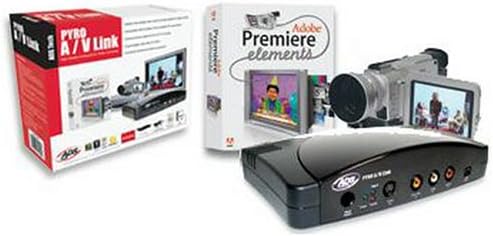
From the Manufacturer The ultimate DV capture and editing solution. A complete, fully integrated hardware/software solution, Pyro A/V Link Professional provides the best value and the best components for capturing, editing, and exporting both analog and digital video in real time. Pyro AV Link with Premiere Elements includes Pyro AV Link, an external box that connects to your computer via FireWire. With Composite, S-video, and component-video connectors, you can capture video from any source. . For video editing, it includes Adobe Premiere Elements software offers the perfect combination of creative control and reliability for home video editing. It automates tedious tasks so you're free to create cool effects and transitions and easily burn DVDs (Adobe Premiere Elements works only with Windows XP).What's in the Box Pyro A/V Link device, Adobe Premiere Elements, a 6-foot composite-video/stereo audio cable (red, yellow, white RCA jacks), a 6-foot S-video cable (4-pin Din), a 6-foot 6-pin-to-6-pin IEEE 1394 cable, a 6-foot 4-pin-to-4-pin 1394 cable, an AC power adapter, a user's manual, and warranty information. Review: A Real Nice Tool for AV work - This device has become hard to find, and that's a shame. It is one of the few devices that delivers real results without too much BS. While USB 2.0 is great for drives, scanners, printers, and such, it never has delivered the video performance that firewire does. I've used PCI and USB based tools for importing analog video, and the results are mixed and consistently worse than this firewire solution. This device really is a hardware only solution, though Adobe Premier Elements 3.0 included as well. The hardware converts analog A/V to firewire or vice versa. If you already have a DV camera, you likely won't need this (though it still has many uses), but if you have analog sources, it's very handy to have. Any S-Video, composite, or even component source is converted to a firewire DV stream, which can then be captured using any DV aware software. The encoding takes place in the hardware and you simply need a PC capable of DV capture (decent hard drive, though even 99% of laptops can accommodate this these days). Note, this tool purely captures the DV stream and does not encode it into Divx, WMV, or any other highly compressed format, and as such the video files will be very big. This makes for easy editing, but you will need a fair amount of disc space. Being a hardware only solution, you don't need to install any drivers or software, and it works with all of the major video editing tools (Mac or PC). Review: Bare bones, but works as advertised! - I bought this unit to transfer family movies from an analog Sony Handicam and from old VHS tapes. I also needed it to work with both Mac OS and Windows computers. I have only tried it with the Mac OS and iMovie so far and it works great when transferring from the Handicam or directly from a cable TV feed. I've not yet tried using it with Windows or VHS tape, but I suspect my results will be similar. My only complaints and the reason for the 4-star review: Of the cables included, I've only used the RCA cable and the firewire cable, and the RCA cable was of low quality. I replaced it with a thicker cable with gold connectors to improve transfer quality. Also, and this is nitpicky for sure, the lights (leds) on the front of the unit are way too bright, so bright in fact that when they are lit I can't read the labels (Power/Analog/Digital) silk-screened above and below them on the face of the unit. As for the included software, I can't address that as I didn't open it or need it - I plugged it into my Mac and it simply worked. I'd recommend this product for what I'm using it for - especially for the price.
| ASIN | B0007KI7SU |
| AV Output | Composite, S-video, Component |
| Brand | ADS Technologies |
| Built-In Media | 4-pin-to-4-pin 1394 cable, AC power adapter, Adobe Premiere Elements software, Composite-video/stereo audio cable, IEEE 1394 cable, Pyro A/V Link device, S-video cable, User's manual |
| Compatible Devices | Laptop |
| Customer Reviews | 3.6 out of 5 stars 15 Reviews |
| Global Trade Identification Number | 00757887555009 |
| Hardware Interface | IEEE 1394 (FireWire) |
| Item Weight | 2.65 Pounds |
| Manufacturer | ADS Technologies |
| Mfr Part Number | API-555 |
| Minimum System Requirements | Windows XP |
| Model Name | Pyro AV Link |
| Model Number | API-555 |
| Operating System | Windows XP |
| Platform | Windows, Windows XP |
| Tuner Type | NTSC, PAL |
| UPC | 757887555009 |
| Unit Count | 1 Count |
| Video Capture Resolution | 720p, 1080p |
R**F
A Real Nice Tool for AV work
This device has become hard to find, and that's a shame. It is one of the few devices that delivers real results without too much BS. While USB 2.0 is great for drives, scanners, printers, and such, it never has delivered the video performance that firewire does. I've used PCI and USB based tools for importing analog video, and the results are mixed and consistently worse than this firewire solution. This device really is a hardware only solution, though Adobe Premier Elements 3.0 included as well. The hardware converts analog A/V to firewire or vice versa. If you already have a DV camera, you likely won't need this (though it still has many uses), but if you have analog sources, it's very handy to have. Any S-Video, composite, or even component source is converted to a firewire DV stream, which can then be captured using any DV aware software. The encoding takes place in the hardware and you simply need a PC capable of DV capture (decent hard drive, though even 99% of laptops can accommodate this these days). Note, this tool purely captures the DV stream and does not encode it into Divx, WMV, or any other highly compressed format, and as such the video files will be very big. This makes for easy editing, but you will need a fair amount of disc space. Being a hardware only solution, you don't need to install any drivers or software, and it works with all of the major video editing tools (Mac or PC).
B**R
Bare bones, but works as advertised!
I bought this unit to transfer family movies from an analog Sony Handicam and from old VHS tapes. I also needed it to work with both Mac OS and Windows computers. I have only tried it with the Mac OS and iMovie so far and it works great when transferring from the Handicam or directly from a cable TV feed. I've not yet tried using it with Windows or VHS tape, but I suspect my results will be similar. My only complaints and the reason for the 4-star review: Of the cables included, I've only used the RCA cable and the firewire cable, and the RCA cable was of low quality. I replaced it with a thicker cable with gold connectors to improve transfer quality. Also, and this is nitpicky for sure, the lights (leds) on the front of the unit are way too bright, so bright in fact that when they are lit I can't read the labels (Power/Analog/Digital) silk-screened above and below them on the face of the unit. As for the included software, I can't address that as I didn't open it or need it - I plugged it into my Mac and it simply worked. I'd recommend this product for what I'm using it for - especially for the price.
M**G
Disregard the 1-star review
This device will indeed capture from component video. I've submitted a picture showing a snapshot of something captured from a HD channel. To do this, I had to set the output of the HD receiver to 4:3 ratio, tell it to output HD/Widescreen in Letterbox, and change the type to 480i. You'll wind up with the black bars above and below your widescreen video. The simplest software that I know of to remove the bars is Dr. DivX. You may be able to do it with the included Adobe Premiere Elements. I haven't fully learned the software yet. So basically, through component you won't be capturing video in true HD resolution but it will be roughly DVD quality. Personally, I'm pleased with my purchase. It would have been nice to get true HD captures, but I think that may be a digital signal and this box captures analog only. It says so clearly in the specs. Can't wait for football season! Also wanted to say that Amazon shrunk the picture. It was 720 pixels wide when submitted (same as video).
J**K
Absolute garbage.
Save your money and buy a stand alone DVD/HDD recorder (I bought the Pioneer). If you are transferring VHS tapes and there is any noise you will get gaps, there is color noise at the bottom of the screen on all videos captured with this. I got fed up and sold it on eBay. Also unless you have the SSE2 instruction set on your computer (has to do with the processor) the adobe won't run, doesn't tell you that in the specs, another "Surprise!" . If you are not a complete computer head, you don't have a snowballs chance of getting satifactory results with this.
S**.
Buggy Piece of Junk
My first ADS unit arrived DOA from Amazon, probably damaged in shipping, and it would not be recognized by my video editing machine (AMD 3000+, 2GB RAM, 500GB SATA HDD). My second ADS unit arrived 3 days later, Amazon has very good customer service, I'll give them that much, they refunded my $3.99 I paid for super-saving 1-day shipping and sent the unit out overnight delivery, since I needed this to finish a project. Kudos to Amazon. Ok, the tale of the tape: This item DOES NOT seamlessly integrate with my NLE software (Premiere Pro 1.5) nor does it work seamlessly with the free copy of Adobe Elements 2.0 that comes with it. I went to the ADS tech support website for a firmware or driver update, and there are none to be found. I have had the unit hooked up to my machine for a few hours, and have only been able to capture one piece of video without any incident. I downloaded ADS's proprietary capture program (WMCAP.EXE - 0.6MB), which worked for one clip, then crashed. I have restarted my machine over and over, and usually have to unplug the firewire cable to get the device to be recognized by Windows XP Home rev.2. This thing is a piece of junk, don't buy it unless you want to be angry and disappointed. I am an A/V professional for a living, and should have known better than to trust a $150 device over a professional one. The A/V cables that come with this device are sub-standard. You do get 2 firewire cables (6-6 and 6-4) but the 6-6 was too short to be of any use. You literally have to mount the unit with tape on top of your computer, because it's made of plastic and will try to leap off the machine every time you unplug a cable (gaffer tape to the rescue). I am going to try ADS tech support again. If I need to send the unit in for a firmware update as another reviewer intimated I will be returning this device to Amazon and going with a Canopus or other device from a reputable video hardware company. Caveat Emptor. 5/4/07: Unit was returned to Amazon shortly after my review. Additional online research confirmed this unit will not work with an Athlon chipset computer despite the company saying it will (error with SSE2 instructions). Their tech support staff is rude and obnoxious and blamed my lack of understanding (20 years with computers, 15 with A/V equipment), rather than their junky hardware. I'm just jumpering my DVD & VCR through my DV-Camera as a temporary solution and using the firewire out from my camera. If you need a digital/analog conversion box, check out the Canopus brand ones and avoid anything made by ADS. Canopus has top notch customer support and firmware upgrades and they don't talk to their customers like they are idiots.
J**H
Old Model Old Software No Support
I wanted a ADS API 557, was directed to a number of vendors and this one in particular sold an old product API 555 and an old software Premiere Elements 2.0. When I complained about the switch, I got zero response. The API does work, but the input connectors and the output connectors are not securely mounted and anyone using this device should not plan on moving the cables once they are connected. Buy extra cables and make the connections to the ADS one time and do not move them. For the same money as this API 555 you can get the 557 with Elements 3.0, but you have to shop carefully to be sure what you are getting. I give the product 3 stars, and Amazon and the vendor 1 star. If you want a better quality all-around, get the Canopus. You will pay more, but in the long term it will still be working when the ADS isn't.
A**A
Very well priced and functions as the expensive counterparts
I use it with a Mac computer, all I had to do is plug the Pyro AV Link to the firewire port and plug my analog video to the Pyro AV Link. Very simple to use. My only annoyance that sometimes it switches from Analog input acceptance to Digital all by itself, not sure if there is something that triggers this. But a light in the front (red - Analog and blue - Digital) pretty much indicates that and switching is as easy as touching a botton on the ADS Pyro. Great Product, unbeatable price.
J**S
Great product!!
At the beginning, I wasn't so sure because of the reviews but definitely worth my money.
Trustpilot
2 months ago
3 days ago