Buy anything from 5,000+ international stores. One checkout price. No surprise fees. Join 2M+ shoppers on Desertcart.
Desertcart purchases this item on your behalf and handles shipping, customs, and support to Lithuania.
🎯 Keep your game sharp and your lens sharper!
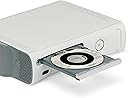
The Digital Innovations 4190100 Clean Dr. Laser Lens Cleaner uses a patented 10-brush cyclone system with zero-clearance technology to safely and effectively clean Xbox 360 laser lenses, improving device longevity and enhancing image and sound quality. Compatible with all Xbox systems and featuring multilingual instructions plus sound calibration tools, it’s the essential maintenance tool for serious gamers.
| ASIN | B0041A3JS0 |
| Audio Recording | No |
| Best Sellers Rank | #19,755 in Video Games ( See Top 100 in Video Games ) #497 in Xbox 360 Games |
| Brand | Allsop |
| Built-In Media | CleanDr® for XBOX Laser Lens Cleaner safely cleans the laser lens on XBOX gaming systems to prevent skipping, freezing or distortion |
| Color | white, black, gray |
| Compatible Devices | XBOX gaming systems |
| Customer Reviews | 4.0 out of 5 stars 819 Reviews |
| Enclosure Material | Plastic |
| Global Trade Identification Number | 00659846419011 |
| Item Weight | 0.44 Pounds |
| Manufacturer | Digital Innovations |
| Manufacturer Part Number | 4190100 |
| Material | Plastic |
| Model Name | 4190100 |
| Model Number | 4190100 |
| Number of Items | 1 |
| UPC | 780320021090 659846419011 791064679454 191611482900 777781774054 846764229390 079531990784 863121577949 885721210439 080000239822 013523698371 072091732849 UPC 780320021090 659846419011 791064679454 191611482900 777781774054 846764229390 079531990784 863121577949 885721210439 080000239822 013523698371 072091732849 See more |
| Unit Count | 1.00 Count |
| Water Resistance Level | Not Water Resistant |
J**S
Worked first try! Multiple disk error messages and 30+ minutes of me restarting my game to get it working...GONE!!!
Love this product! I've had issues with my xbox 360 for about a year now. I wasn't sure what the issue was exactly, had heard it could be the laser, the magnets, etc. I'd try to play my disk and end up with different error messages saying the disk couldn't be read, and over time it only got worse. It had gotten to the point where it would take me 30+ minutes of opening and closing my disk tray to get the game to read. I was under the impression that my xbox was just on its last legs and didn't really think that a lens cleaner would do the job. After months of buddies telling me to get it, I finally decided to try it out. I put the disk in and it read right off the bat, which was kind of surprising considering how long it would take to get a game to read. I followed the easy steps and ran the cleaning process about 4-5 for good measure. I took out the disk, put in a game and it worked first time. Turned off the xbox, started the game again, and again it worked the first time. Being the skeptic I am, I came back two hours later and again worked the first time! I'm extremely pleased with how simple it was to get the issue fixed. Almost as pleased as I am frustrated with myself for not buying it sooner. An easy 5 stars from one STOKED customer! :)
J**.
Fixed my 'Open Tray' and 'Red Ring of Death' Problem - Saved $100 + shipping + downtime to send to Microsoft!
My Xbox 360 is ~4 years old and just started not reading discs, games, DVD's, - wouldn't read anything. I first got the 'red ring of death' and after a reboot, all attempts led to 'Reading' then 'Open Tray'. I thought the optical drive had failed and was prepared to ship it to Microsoft for an out-of-warranty repair. After reading the reviews, I decided to give this a try - and it worked! Now, it didn't work the first try - a problem I think has likely caused some 1 star reviews. I had to cycle it 8+ times for it to work. Comments on the process: Let's assume your optical laser is, in fact, dirty and that you don't have a hardware problem. Now, let's assume that this cleaner needs a cleaning cycle time of 2-3 minutes to clean your optical laser. Lastly, let's assume that when you insert a disc your optical drive will spin up to speed for ~ 30 seconds or so before 'giving up', spinning down to zero, and reporting an unreadable disc. If your expectation is you will pop this in and magically fix your console, you would be wrong because the cleaning brushes cycled for 30 seconds - not 2-3 minutes. What you have to do is continually open/close the tray or manually reinsert the disc. Do this enough times, and you may have success. In my case, I had to open/close the tray (gaining ~30 seconds of spin time each time) 8-10 times before the disc was readable and I was able to 'properly' hit the play button to run the disc cycle. I've read some people had to do this for at least 10 minutes before it would work. In my case, I'm highly impressed as it saved me $100 + shipping + downtime to send to Microsoft for a repair on my 360 due to some dust that found it's way into the console. In my case, I opened/closed the tray until the disc was recognized, ran the cleaning cycle, polished up my game disc, and was back in business in 10 minutes or so. This is a great product. Now, for those of you with a true hardware failure and/or a misaligned optical laser (common problem), this won't fix your problem as you will need a HARDWARE repair, not a cleaning. If you crashed your car would you wash it and then complain the dent was still there? If you use this cleaner and it fixes your problem, it's 5 stars. If you use it (following my instructions) and it doesn't fix your problem it's still 5 stars because it has allowed you to confirm you have a hardware problem and not a speck of dust!
M**0
Good buy
Bought it because I thought it would help a problem I'm having with my Xbox 360 not being able to read games, turns out it reads DVD's just fine, it's just the games it has trouble with. Anyway, it serves it's purpose and will keep using it on my other devices.
H**L
DON'T WASTE YOUR MONEY OR OPEN YOUR XBOX WITHOUT TRYING THIS FIRST!
This did not work for our Xbox. It kept saying unreadable disc every time we put in a game, including a brand new one that was never opened. I put this one in and said the same thing after pressing start about 20 times. So I decided to go on You tube to see how I could open the Xbox without damaging it and was going to clean the lens by hand. Thank God I did, as that is when I found a lifesaver! I came across a video that was posted that said to take out all discs and close the drawer. Then stick an envelope into the top part of the space where the drawer opens to load discs and move it from side to side a few times. Really?! That was just crazy, surely something that ridiculous would not work. I figured it couldn't hurt to try because I really didn't want to open the Xbox and take the chance of it not working. So I got an envelope and put it in and moved it from side to side about 5 times. It is a bit hard to get the envelope in there but I found you can also use a piece a paper and it is about the same. Anyway, I took out the envelope, opened the disc drive and put the same game in that was saying unreadable and it loaded immediately! I was stunned and my son was too.
D**.
Great product, but didn't solve the problem.
I recently ordered this item for an XBOX 360 that I hardly use anymore. I kept getting the same 'Open Tray' error even when multiple discs were inserted. Although, ultimately, it did not stop the console from going back to 'Open Tray' (I believe I have a faulty laser lens), I can say with confidence that it DID clean my PS3 (I took the risk of voiding the warranty on a product I purchased 15 years ago) so I am happy with the product and the price I paid. Would order from the vendor again (if needed) in the future.
T**T
Waste of money
I'll keep this review short. My Xbox 360 would no longer read discs. I didn't want to open up my console so I bought this product to clean my laser lens. It arrived and I put it in my disc tray - nothing happened - it would not clean the lens. I must have inserted and ejected the disc 100 times and it was not doing the job. I ended up opening and cleaning my xbox 360, specifically the laser lens, myself, put it all back together and she reads discs like a champ. After doing all of that and spending a few dollars on this ineffective product- I can only give it one star. (0 stars would be more appropriate.) Bottom line- IT DID NOT WORK FOR ME!!! I feel like it was a cash grab. I am only writing this review as a warning for anyone else who doesn't want to be misled into buying an ineffective product. Buyer BEWARE.
L**E
Perfect once the disc reads.
My xbox 360 have had this problem where it won't read any of the disc most of the time. I have to keep ejecting and putting it back in until the disc is read. Sometimes the process takes 10 mins to work. So I got this cleaner. I put this disc in and once it read. I play this "DVD" and start the cleaning process. When it reaches 100%, the process is done and it will do "clean" the lens to maximize the audio as well but I didn't need that. After that I just stick in any disc and it has been. It works perfectly. Intended for xbox 360 and that is what I used it for. 5-star. I want to be universal and give it 4star instead but it just work so good for my purpose.
C**Y
If your 360 is like mine and will not read discs at all
Wow, can't believe it, works perfectly. My 8 year old xbox 360 has not been able to read any discs in over a year and after inserting this disc and running the cleaning, it plays discs flawlessly. TIP: If your 360 is like mine and will not read discs at all, it will not read this disc either, initially. You must open the disc tray, force the disc tray close and proceed to beat the top of the 360 (right above the disc tray) with your controller. I know this sounds ridiculous, but it will get the disc to play eventually and after running the cleaning, solve your disc playing problems. There are videos on YouTube demonstrating this, if you need. Search "360 won't play discs".
A**R
Works beautifully!
I have no complaints with this product. :)
G**S
Worked great for our old Xbox
After reading some of the reviews I was not really expecting it to work, but I thought it was worth a try. The problem was that our old Xbox had stopped reading discs properly and took such a long time to work, you had to keep opening and closing the tray and it might finally read the disc after 10+ attempts. When the disc arrived I didn't have high hopes as it was basically just a disc with some very small brushes on it. I used it once and the result were amazing! I was expecting to have to run it a few times but it worked first time. After the cleaning process had completed I sat through some of the audio test stuff but then took it out as I didn't have an audio problem. Our Xbox runs games perfectly now, I'm so pleased I tried it.
A**.
Buen producto
Es muy bueno y de verdad limpia el lente, después de tener mi XBOX 360 empolvado este disco lo regresó a la vida.
A**R
Amazing!
It came before the estimated time of arrival and the product saved my Xbox! I thought for sure that I would have to buy a new one. Thank you!
M**.
No me funcionó
No me funcionó
Trustpilot
1 month ago
2 weeks ago