🚀 Elevate your workspace anywhere—because one screen is never enough!
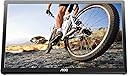
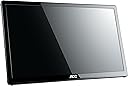
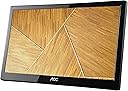
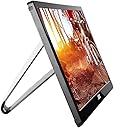
The AOC e1659Fwu is a 15.6-inch ultra-slim portable LED monitor featuring a 1366x768 HD resolution and 200 cd/m² brightness. Powered and connected via a single USB 3.0 cable, it offers plug-and-play compatibility with Windows and Mac. Its lightweight 2.4-pound design, auto-pivot functionality, and included carrying case make it the perfect travel companion for professionals seeking instant dual-monitor productivity on the move.


| ASIN | B00CMKOVMO |
| Additional Features | Portable, USB Hub, Ultrawide Screen, Wall Mountable |
| Aspect Ratio | 16:9 |
| Best Sellers Rank | #77,178 in Electronics ( See Top 100 in Electronics ) #1,774 in Computer Monitors |
| Brand | AOC |
| Brightness | 200 cd/m² |
| Built-In Media | HDMI Cable, Monitor, Power Cord, User Manual |
| Color | Black |
| Compatible Devices | Computers or laptops with a USB 3.0 port |
| Connectivity Technology | USB |
| Contrast Ratio | 500:1 |
| Customer Reviews | 4.2 out of 5 stars 6,635 Reviews |
| Display Resolution Maximum | 1366 x 768 Pixels |
| Display Technology | LED |
| Display Type | LED |
| Global Trade Identification Number | 00685417062485 |
| Hardware Connectivity | USB 3.0 |
| Has Color Screen | Yes |
| Image Contrast Ratio | 500:1 |
| Is Electric | Yes |
| Item Dimensions D x W x H | 8.63"D x 14.56"W x 0.87"H |
| Item Type Name | portable monitor |
| Item Weight | 2.4 Pounds |
| Manufacturer | AOC |
| Model Name | AOC Portable Monitor |
| Model Number | E1659FWU |
| Mounting Type | VESA Mount |
| Native Resolution | 1366x768 |
| Number of Component Outputs | 1 |
| Pixel Pitch | 252 |
| Power Consumption | 8 Watts |
| Processor Count | 1 |
| Refresh Rate | 60 Hz |
| Resolution | XGA Wide |
| Response Time | 12 Milliseconds |
| Screen Finish | Glossy |
| Screen Size | 16 Inches |
| Screen Surface Description | Glossy |
| Series Number | 1659 |
| Shape | Rectangular |
| Specific Uses For Product | Business |
| Total Number of HDMI Ports | 2 |
| Total USB 3.0 Ports | 1 |
| Total Usb Ports | 1 |
| UPC | 667649004044 672773735115 041114168231 780746943365 809394262038 012300309639 808112928720 685417062485 804067188110 |
| Unit Count | 1.0 Count |
| Viewing Angle | 90 Degrees |
| Voltage | 5 Volts |
| Warranty Description | 3 Year Manufacturer |
| Warranty Type | Limited Warranty |
M**3
AWESOME PRODUCT
This is the best laptop accessory that I have! I travel for work and bring this everywhere with me. It is plug and play - never had any issues with it ... worked straight out of the box as advertised. I love that you are able to turn it to either portrait or landscape without changing any settings - just rotate the screen. It works just like a phone! It also has its own icon in the tray so that the display can be set to extend to left, right, top, bottom, mirror, main display or off without having to go to your DISPLAY settings. I had to set up 2 additional monitors for our home desktop and it was such a pain. I was tempted to buy two more of these screens to use at home. But we already had the other monitors which I still cannot get to display with the resolution that I want. Everywhere I go, people are fascinated by the extra monitor. it is light - great portability! It is sleek looking and it just works! I do agree with one of the other reviews that the cord is very sensitive. If you move it slightly, the connection will disconnect. Other than that, it is everything that I could ask for!
T**Y
Used with HP envy dv7 17.3" Laptop with Windows 8.1 for school
My workplace spoiled me with having two monitors to perform my daily functions. After I purchased my HP envy I was forced back to doing my school work on one monitor. This, of course, was not working for me. At first, I was using my kids 20” LCD TV and the HDMI connection for a second monitor. However, this was just not working (for the kids, lol). So, I jumped on Amazon in search of another monitor but wanted something that I could keep with my laptop all the time. Walla, I found the AOC 16” USB powered monitor. Right out of the box I plugged it up (with the provided cable). Windows immediately recognized the new hardware and started searching and downloaded the driver. The only problem was it did not have the proper driver to detect the monitor being in landscape versus portrait and I would have to manually change it. But as soon as I popped in the disc; It updated and worked fine. It is not 1080p, but the picture looks really good. It is clear and crisp and has a lot more depth than what I expected. The provided cable is designed to plug into the USB 3.0 and into a USB 2.0 port to power the monitor. Don’t make the mistake that I did in ordering a second cable. The part that plugs into the monitor is not the same as a mini USB. It is completely different. I assume it is AOC’s design. It also comes with a nice soft feeling sleeve that comes with it for storage. This is pretty cool but not very useful to me. I simply slip it in the extra pocket in my laptop case, when not in use. So far, I have not experience the glitching that others have noted. This product has been a great asset for me when doing school work. I can pull up my e-books on it while I do my work or write an essay my laptop screen. If you are looking for something to help with school or work, this is perfect. Maybe you need to make up a presentation and want to display it to other while you control the slides. There are so many uses for a dual monitor from entertainment to multitasking. This thing is an excellent addition to any computer or laptop.
S**N
Good for work
This monitor works well for me. I use a Macbook Pro with retina display. If you have a Mac, in order to make it work at all, you need to go to the AOC website and download the Mac driver. The USB 3.0 jack works, but is sadly the only one that works for mine. The picture quality is fairly good. The biggest drawback is that the driver does not add any controls, so there is no way to adjust the brightness and only minimal control over anything else. Sometimes it errors in funny ways - such as a window not showing up quite right, or the background bleeding through the foreground window. But in general, this goes away if I move the windows slightly. I "solved" the brightness issue by simply turning the screen away from me when it is too bright for my surroundings. However, because the picture quality is not pristine (still good, but not perfect), the brightness cannot be adjusted, and it sometimes has minor glitches in the image, I would not use this monitor for gaming. The only other drawback is the case. It comes with a fabric or foam case that fits rather well around it, so it can be difficult getting the monitor in and out without touching the screen. It also doesn't have a strap or handle, so I end up carrying it under my arm. In general, I am also carrying my computer, headphones, and papers with me, so it is a bit cumbersome. I sometimes worry that the screen might break if I manhandle it too roughly, but so far it remains unscathed. So in short: I love it. Wish I could adjust brightness and that the case had a handle. UPDATE: I have solved the carrying problem by simply putting it in a large bag, which also carries my papers and headphones. So not a big problem However, it has demonstrated a new strange behavior. I use Safari primarily, but keep Chrome as an alternate web browser. Today I was using Chrome and moved the Chrome window over to the AOC monitor... and the website image messed up. If I changed the size, I could sort of make out that I was on wikipedia, but I could not navigate the site safely or read anything. The wrong size made it just a jumble of lines. As I dragged it back to my laptop screen, it miraculously returned to normal. Halfway between the two, it was obvious the monitor simply cannot display Chrome. Weird.
W**N
Works so well for my portable system, it ought to have a personal name!
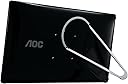
I am using the AOC e1659Fwu 16-Inch USB-Powered Portable LCD Monitor (Latest Version) monitor with my ACER ASPIRE ONE 722-0427 net book which has an 11.6" screen with a native resolution of 1366X768. This computer has three usb 2.0 ports. I loaded the drivers as recommended in the online manual (I recommend you download this manual from AOC before you make a purchase to familiarize yourself with the features and the download process). During the download and installation of the drivers pauses or apparent "final points" in the installation should not distract you. Just make a cup of tea and listen to a recorded book. I did not time it but I would guess the entire process took about 20 minutes so. Do not become anxious or impatient. Just sip tea for half an hour. When you reach a pause or or apparent end point in the process, wait a couple of minutes before taking action. Through a comprehensive menu I was easily able to set the screen up. I wanted to set my system to blank my net book screen and use the AOC monitor as my primary video output. This was quite easy. There are other options, which may be more suitable to your needs, but I have a small work area and consider myself a minimalist so I wanted the cpu off the desk and out of my way. Now I simply have the 15.6" AOC monitor and a small wireless keyboard and mouse in front of me. For writing this is an absolutely perfect arrangement - No clutter, all workspace. Absolutely everything worked as advertised. One USB 2.0 port did the job. The drivers work perfectly. The image is great and plenty bright for a well-lighted room with an open window next to the desk. According to my research before purchasing the AOC e1659Fwu, some other similar monitors reportedly have less bright/clear screens or seem to have compatibility problems. Compatibility is a path you have to investigate before buying any monitor. My screen resolution was a perfect match. I cannot speak to other computer screen resolutions. Most, I imagine, will be fine. The protective sleeve provided is of high quality although I would have preferred it to close with a zipper or have an envelope-like folding cover for the end. The open end in this case is well-secured with a wide strap that has a Velcro closure...quite adequate but not impervious to spills, dust, fingers reaching into it, etc. It also lacks a carrying handle (most other sleeves lack this feature as well). The design of this monitor is very attractive and the "leg" that supports it is strong. When the leg is folded into its recessed cavity, the monitor makes a perfectly smooth surface to slip into the provided sleeve. As a precaution, I intend to cut a piece of foam board to fit the sleeve and cover it with soft fabric to protect the screen from damage from luggage mishandling and bumps in public places. The device is not fragile by any means, I simply want to protect my investment. Nothing is ever perfect. Few things operate as well as advertised. Some reviews may exaggerate. Many computer peripherals may require professional tweaking.....but not this one. Although I have only used it a short time and have not experimented beyond the things I wish this monitor to do for me, I have put it through its paces as best I can and it works perfectly in my minimalist configuration. Just check your configuration compatibility. That is always the buyer's responsibility; beyond that, expect stellar performance.
C**R
Not Compatible with Surface Book
I received the monitor - great concept - monitor with its own stand. Very large - larger than I expected, but fits well in my briefcase. Loaded the software as directed and hooked up the monitor. Other than the fact that the connection in the back of the monitor is hard to attach, I loved it. Used it for about 5-10 minutes and then packed it up. Has it's own sleeve, which was great. Put it on my coffee table. About an hour later, I decided I wanted to use it again for doing some of my work. Took it out of the case. It had a bleed on the screen. I was thinking of returning it, but figured, you know what, if it works, I'll just keep it. It didn't - the bleed caused the picture on the monitor to be nothing but shapes. I called Amazon customer service and they were fantastic - exchanged it immediately. The new one came and I figured that, since I already had the software loaded into my computer, all I have to do is attach the monitor. It turned on, but my computer refused to recognize it. I figured maybe I needed to use the software that specifically came with that monitor. Nope. I read online articles about how to fix, which had me loading a newer version of the software on my computer. Nope. Spent hours trying to figure it out to no avail. Called AOC customer service. The guy walked through all of those steps with me again and had me try everything again. Nope. He said there is a KNOWN compatibility problem with Surface Book because it does not give off enough power. I was confused because the first monitor worked fine ... until the bleed. He told me that not every monitor is made the same in the manufacturing process and some require more power. I said that there's a second USB which comes with the unit which is supposed to be for less powerful laptops and that I tried it and it didn't work. He said that the second USB is not made for Surface Books. Because of what he said, I decided to try one more time and get another monitor to see if it was one of the ones that requires less power. Nope. Returning it. Nice product if it works with your system. Before you waste time and money, you might want to contact AOC to find out if your specific unit is compatible with their product. since they do not provide that information in any of their advertisements or literature.
D**E
Great Monitor and Great Support
1st a little background information. I have used this nearly every day (including weekends). Work has had me traveling at a minimum of every other week. I also end up going to meeting sites through out my county for outside of work activities where I need a laptop. In short It has been used a lot and traveled a lot. I purchased this monitor in March of 2014. It arrived as expected and worked as expected. I have a laptop Case from Targus and it fits well inside the document compartment. The image quality has been excellent for Documents, Drafting, Movies, and Movie Editing. In short its a monitor. You should be able to use it as you use all other monitors. Not long after first using the monitor I started having connection issues. The USB cable was not seating well. With first talking with AOC Tech support it was recommended to try a new cable. A new one was shipped to me at no additional expense. That did not solve the problem. I was still able to get it to work by playing the giggle the cable, waving a magic wand, crying out Shazam! and it would work. I was traveling very heavily at this point so it was not convenient for me to return the monitor. This brings us to today. On Thursday of last week (Oct 30, 2014) I emailed Tech support to discuss returning it for repairs. That evening I was issued an RMA number with shipping instructions. Friday Oct 31st I shipped it out via UPS. They received it on Monday Nov 3. I received notifications from their RMA department throughout the process. On Nov 5th I received word that it was being sent back to me and I would have it on Nov 6th. A 1 week turnaround including shipping. I call that excellent response. This company has always answered emails promptly, and given useful advise. ***Update 10/19/16*** I still use this often at home and when traveling for work. Great size and is holding up well. When this one goes I will get another. ***Update 3/25/2018 Still works well, still used often. ***Update 4/29/2020 It still works. However, it is starting to show the strain of being in my backpack (in the sleeve I bought for it). The image fades in a couple of areas. It is still useful but I am starting to look for a replacement. 6 years for a portable Laptop that has spent much of its life in my backpack is not bad at all. It has seen me through various projects, Hotel, Airport, and work-life. It also saw me through my online degree.
K**N
but it works great on my windows 10 asus laptop
I haven't used this as much as I wanted to yet, but it works great on my windows 10 asus laptop. The displays and bezels on my laptop screen and this monitor are almost identical in color and style and it sits at the exact same height, which was a nice bonus. My co-worker saw it and needed to have one and said there is no way to adjust the brightness, which I found difficult to believe, but I didn't feel the need to do that as of yet. It's also very slim and fits right into my laptop bag without noticing it much. Not have needing a power supply for it is also a huge bonus, though I am imagining if your laptop is not plugged in, it probably takes a hefty told on your battery. Anyway, a solid monitor for a solid price. Not related to this product, but my same friend who bought it actually found a an ipad app that will let you use it as a second monitor for like 10 bucks. I have an ipad 2 that I never use anymore and might have went that route had I known (of course the screen would be much smaller, but if it's just something you feel like you might not use all that often- as I mentioned I haven't- it might be another option for you if you have a tablet handy). I still don't regret the purchase, and once I move to a bigger desk at work, I am sure I'll start using it more.
B**S
Installation Required, Intended As Second Monitor
When I bought this it was not clear that it was not simply plug-and-play like you would expect of most monitors. The situation was that I had a tower PC from work (that had been used as a server), and only the tower, where it had previously been set up with a monitor. This tower was taken when the building was sold, under the assumption that it'd be a simple matter of getting another monitor for it. It turned out only the USB ports on the tower were active, necessitating the use of a USB monitor. Unfortunately, when I opened this box, it turned out there was an installation CD. This would not even be useful for my laptop. The AOC drivers from their website are packed inside a .rar, and then it turns out they are incompatible with Windows 10. So I had to get a Windows 10 compatible executable from displaylink.com/software Now, for the real problem. This product is clearly intended as a second monitor. If you have no existing monitor at all, how do you install the monitor drivers? The PC is on. But you cannot see anything. Recall again I only had USB ports to work with, the HDMI had a sticker over it saying these ports were inactive, and there was no VGA or DVI. The only options were to try to get its old monitor back or try to install the drivers blindly. I was able to pull that off, amazingly enough. You can do it by putting that DisplayLink executable file onto a USB drive, re-name it something simple like A.exe , then blindly get past your login screen. Windows + R to get the run prompt, then write cmd.exe and enter, then you have to guess what letter the USB drive is (e.g. type "F:" and enter), then type A.exe and enter, then you might have to hit Tab a couple of times to get it selecting "Yes" on the install prompt, then enter. Then enter periodically until you get to the end of the installation, and suddenly the monitor turns on and works. So, the product works. The visuals are adequate for my limited purposes with it. Whole lot of hassle might be avoided if the monitor just auto-installed what it needs without any user prompts. (Though, again, their version of the software is incompatible with Windows 10.) Your computer might already have the software it needs, but if it does not, you will need another monitor to see what you are doing to install it. Or try to do it blind, as I described above. Which is not impossible, but difficult. You can use it as a primary monitor after installing it, you will just have a hell of a time doing that without temporarily using another monitor interfaced with the computer in some other way (e.g. HDMI). The three stars on this review are mostly about the unexpected difficulties with the drivers and needing to do installation.
D**D
Excellent side monitor for Laptop - Needs 2 powered USB ports!
These are excellent little side monitors for travel or, as in my case, for permanent use with my laptop. I have 2 of these at my office, so a total of 3 monitors set up in a panoramic array. Picture quality is very good, although available resolutions are not as high as the monitor itself. They DO require powered USB ports (and each one requires TWO ports). Very very worthwhile......I want them for home as well as at work.
H**H
Easy to plug in and use
Does EXACTLY what you need in a portable office. My Workmates are Jealous!
H**P
Five Stars
Good product
J**S
Excelente monitor portatil!
El monitor funciona a base de USB 3 e incluye cable y funda de viaje. El Monitor tiene muy buena calidad de imagen, tiene buen tamaño, es un poco grueso, pero es muy ligero. No hay problema para transportarlo, pero es más grueso que una laptop, y un poco más largo que una laptop de 15 pulgadas de pantalla. La relación de precio calidad es muy bueno. La calidad del plástico es buena, pero no lo dejaría caer de alguna mesa muy alta. En general el producto cumplió con las expectativas, la calidad de imagen valen mucho la pena, y la portabilidad. 100% recomendado.
N**I
Perfect!
For this price point ($108), it's worth it! Literally plug and play for my Dell laptop I didnt need to install any driver etc! I love that it comes with its own padded bag. I should have invested in this wayyy earlier! No regrets. BUYYYY IT.
Trustpilot
1 month ago
5 days ago