๐ Diagnose Like a Pro, Upgrade Like a Boss!
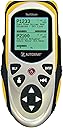
The AutoXray AX7000 Tech Scan Diagnostic Code Scanner is a durable, professional-grade tool designed for both automotive pros and savvy DIYers. It offers extensive OBD-I and OBD-II vehicle coverage, live sensor data recording/playback, and easy software upgrades via SD card or Internet. Featuring a large backlit screen, color-coded cables, and a rugged carrying case, it delivers precise diagnostics with user-friendly multilingual support and programmable hot keys, ensuring your scanner stays cutting-edge for years.


| ASIN | B001LJIZHO |
| Brand | AutoXray |
| Brand Name | AutoXray |
| Customer Reviews | 3.7 out of 5 stars 47 Reviews |
| Global Trade Identification Number | 00796992390198 |
| Manufacturer | AutoXray |
| Manufacturer Part Number | AX7000 |
| Model Number | AX7000 |
| Screen Size | 2.8 Inches |
| UPC | 796992390198 |
J**H
AX 7000
I like the new scanner the AX 7000. Ive been a ASE mastertech for sometime, but only had limited experience with scanners. I did alot of searching, for the money I think its a great tool. Im studying for the Advanced Engine Performance Specialist that I will take in May. The output on the scanner 1996 and up, will access all cars. And the displayed data is the same as the test questions in the study guides. It does STFT,LTFT (fuel trim), O2 monitors basically the type of stuff on the ASE test(L1). Im working on a Lexus, with an evap trouble code, and use this to look up what I need to in the service manual. Also Im going to use the "enhanced obd2" software upgrade offered by autoxray, which should allow a better look at things. All and all im very happy with this unit, and look forward to more obd1 capabilites (honda,etc) I have the toyota upgrade already. Also I got the EZ-Carge 200, but it wont work with the 7000 scanner, Im hoping autoxray will make an adapter, so I can use this accessory at somepoint...
R**I
Works good but batteries don't last long.
I bought the AX-7000 several months ago to replace an older AutoXray EZ-SCAN Pro-pack unit. I used the old unit for 5 years and NEVER changed the Rite-Aid alkaline batteries that were in there when I bought it off of EBay. It would sit in its case for months without use but was always ready to go if I needed it. Now for the battery eater AX-7000! I used this brand new system for 3 DAYS and started getting a low battery indicator. WHAT? I changed them and put in brand new Duracell's. Several days later - LOW battery. This thing even runs off the car power when plugged into the OBDII port so I don't know what makes it so pathetic about sucking the life out of the batteries. I finally took the batts out during storage and just let the unit run off the OBDII power when in use. The unit works OK but has random COMM errors when talking to the cars.
J**R
good tool with minor problems
I bought this tool to help solve a stalling problem with an 02 dodge durango. It turns out the problem was not engine related, but I did me save a lot of money because the tool did prevent me from replacing working parts/sensors because I was able to see that they were all working correctly(I did not just start throwing parts at it). I have since used it on several vehicles including an 05 Chevy Silverado, a 99 Ford van, an 05 Saturn Vue, a 92 Dakota, my 02 Ram, and on my 02 Durango and it has helped every time. The tool is nice because it covers OBD1 vehicles and at the time I had a 1992 Dakota pickup, I now have an 02 Ram and it works great on that. I did have one minor issue right out of the box. The tool did lock up a few times as stated in some other reviews, however I did a software upgrade and it has been fine since. The problem with doing upgrades is that the tool is not compatible with 64bit operating systems like my computer has. You have find someone with a 32bit system which I was able to do. Tech support says they will soon be compatible with 64bit systems but I have not yet seen it. Also the tool may not be 100% accurate with all the data, the tool very vehicle specific when it comes to the live data portion. Don't expect to see all the data on every vehicle mostly because all the car manufacturers allow different data once you get outside the gov. mandated generic OBD2 specs. All that being said keep in mind this tool will not magically fix your car. You still need to know what the information is that you are looking at, and you need to know how modern computer controlled cars operate. I highly recomend buying the Haynes OBD2 computer book, it explains how computer control systems work. Also I recomend going to the Autoxray website and downloading the tool manual before you buy(you will have to do this anyway because it does not come with a printed version)to make sure it will do what you want. It does have a lot of nice fetures depending on the vehicle. A few examples; Chrysler allows an actuator test, with this tool you can manually turn on and off each fuel injector, the fuel pump and various other outputs. you can reset the annoying maint. required light on Chrysler trucks and mini vans, and it has an idle speed test. Ford and GM allow similar tests as well. A lot of itdepends on the year, make, and model. It will also show all emissions tests and monitor systems status so you know if you will pass inspection before you go in. Bottom line, this is a good tool for the money because it covers older vehicles as well as newer ones.It provides a lot of useful information and can carry out useful tests. It has some glitches but lets face it almost everything does, which is why you would need this tool to begin with. Have some patiance and the tool should be fine. Mine has definately saved me more money than it cost.
Y**Y
Product has good features but very buggy
I bought this one purely based on its upgradeable feature, along with other enhance features (graphing, enhanced ODBII, recording ...) that other similar scanner offer. Figure that I won't have to buy another scanner for my older cars. However, my excitement quickly ended. Here are problems that I ran into: 1. Device records data nicely, but I cannot read it off vehicle. Battery installed of course. The unit simply blanks out and requires a power reset. Data is now gone. This is very annoying since you need a screwdrive to remove battery compartment. 2. It cannot read European cars (Volvo car with no engine light on). Again, it simply blanks out. I would expect the device to display something if there are no codes. Again, hate to do a reset. 3. It cannot connect to my PC. It keeps asking for my COM port and not USB. Huh? The device came with USB interface. They should have included the USB driver instead of asking users to download from the web which is very confusing with several options. Anyway, I tried them all, none of which worked. I did not even bother to call Tech supports. I figured that if the unit does not work right out of the box for standard feature (I am not doing anything unique and special). More likely, it will have more problems down the road. I decided to return immediately while I can.
T**H
STAY AWAY! SPX no longer supports this tool
I bought this tool because I needed both OBDI and OBDII capabilities for my cars. For my older pre-1996 OBDI cars this tool not only reads diagnostic trouble codes but also streams live powertrain data (PID) such as throttle position, rpm, manifold pressure, coolant temperature, closed vs open loop mode, oxygen sensor voltage swings, short and long term fuel trim, and so on. Most tools will show these data for OBDII but this tool also shows these data for OBDI, which sets this tool apart in my opinion. I am waiting for the add-on SD cards to be released so I can retrieve enhanced (manufacturer specific) data streams (PID) for my OBDII Honda, not just the EPA-mandated generic data streams. Even without the SD card it shows enhanced (manufacturer specific) diagnostic trouble codes and generic stream data for import vehicles. So I think this tool shows great promise in terms of flexibility and upgrade-ability, and it has performed well on my cars so far. The boot code and program firmware can be upgraded over the internet through a USB cable to the PC using the recently released "Scanning Suite" software, which can be downloaded at no additional cost. I had trouble updating the firmware at first, getting the message "cannot connect to device" and had to call the SPX helpline. They were extremely helpful and solved the problem. It turns out that after you put the tool into "program mode" in prepration for the firmware update, you need to press ENTER. That causes the tool to power down. Then when you turn it back on, it boots up in program mode and the firmware upgrade can proceed. The tool and assorted cables are sturdily built, and would stand up to professional use I would think. Successfully captures and displays approximately 40 frames of OBDII engine PID data from my Honda. UPDATE: I assembled myself a new computer based on the Windows 7 64-bit operating system, and found that I can't update the scan tool using the Autoxray PC software "Scanning Suite" because they do not yet have 64-bit drivers. However, they told me they are working on this (maybe as part of updates to Scanning Suite?). UPDATE Aug 27, 2011: AutoXray has canceled development of the HONDA enhanced OBD data flash card for this tool, which is dissappointing considering how many HONDAs are on the road. Bad business decision. And here it is almost September 2011 and AutoXray still has not released Scanning Suite drivers for Windows7 64-bit operating systems. SPX: This could be a great scan tool if you would only INVEST in it's development at the level it deserves. UPDATE Jan 31, 2012: AutoXray has obviously abandoned this tool. It is still available, but even if at a discounted price it is not worth it because it has been made obsolete. Any mp3 player can communicate with Windows 7 64 bit operating system so what's the problem with SPX and this scan tool?
A**1
Very nice scan tool
This scan tool does it all OBD 1 and OBD2 live data and Code reader. Only problem I have had is that the company that makes the tool has not made an updated software to work with newer windows operating systems I haven't been to their web site in a while but last time I checked the software wouldn't work with my windows 7 operating system not that big of a deal you just cant print any data you record or update the tool for newer cars hopefully they fix this soon.
G**S
Auto ray
Has all you need and more to get the job done! Helps find the trouble code and gets you to the right part to fix your car!
P**N
AutoXray AX7000 Review
This is the 2nd AutoXray scan tool I have owned. My 1st scan tool was very limited compared to the AX7000. Before purchasing a tool like this one, remember you must have some mechanical idea how todays vehicles electrical and fuel systems work. I have over 35 years experience as a mechanic/tech and this is one of the best purchases I have made. Go to AutoXrays web site, download the AX7000 manual, read it and in know time you will be able to use this scan tool to diagnose codes and other problems that pop up on todays vehicles. Remember, read the MANUAL before using.
Trustpilot
2 weeks ago
1 month ago